テクニック SCR32:クライアントサイドのバリデーションを提供し、DOM を介してエラーテキストを追加する
このテクニックについて
このテクニックは、次に関連する:
- 3.3.1: エラーの特定 (十分なテクニック)
- 3.3.3: エラーの修正提案 (参考テクニック)
このテクニックは、HTML と併用されるスクリプトに適用される。
解説
このテクニックの目的は、クライアントサイドでフォームフィールドの検証に失敗したときにエラーメッセージを表示する方法について説明することである。アンカー要素はリスト中でエラーメッセージを表示させる際に使用され、検証が必要なフィールドの上に挿入される。フォーカスをエラーメッセージの場所に移し、利用者の注意を引くために、アンカー要素がエラーメッセージに使用される。アンカー要素の href は、エラーがみつかったフィールドへのページ内リンクを含む。
配置されたアプリケーションにおいて、もし JavaScript が無効になっていれば、クライアントサイドの検証は行われない。そのため、このテクニックはスクリプトが適合性において信頼できる、又はサーバーサイドの検証技術があらゆるエラーを発見し、エラーを含むフィールドの情報とともにページを返すように用いられている場合のみ、十分であるといえる。
事例
事例 1: フォーム冒頭のブロックにエラーを一覧表示する
この事例は必須のフィールドを検証し、さらに特定の書式が必要なフィールドを検証する。エラーがみつかったとき、スクリプトはエラーメッセージの一覧を DOM に挿入し、フォーカスをそこへ移動する。
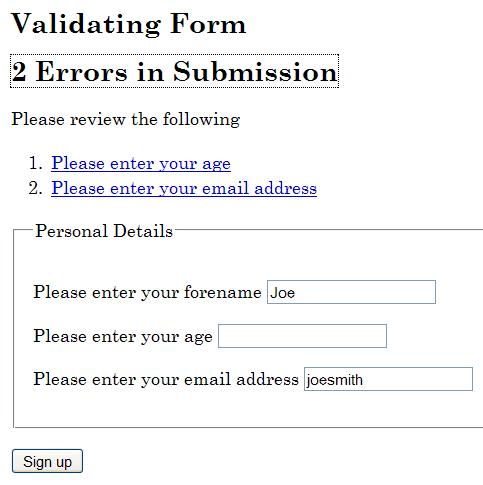
フォームの HTML
<!DOCTYPE HTML>
<html lang="en">
  <head>
    <title>Form Validation</title>
    <meta charset="utf-8">
    <link href="css/validate.css" rel="stylesheet">
    <script src="scripts/validate.js">
  </head>
  <body>
    <h1>Form Validation</h1>
    <p>The following form is validated before being submitted if scripting
      is available, otherwise the form is validated on the server. All fields are
      required, except those marked optional. If errors are found in the submission,
      the form is cancelled and a list of errors is displayed
      at the top of the form.</p>

    <p>Please enter your details below.</p>

    <h2>Validating Form</h2>
    <form id="personalform">
      <div class="validationerrors"></div>
      <fieldset>
        <legend>Personal Details</legend>
          <div>
            <label for="forename">Please enter your forename</label>
            <input autocomplete="given-name" class="string"
             id="forename" name="forename" type="text" value="">
         </div>
         <div>
            <label for="age">Please enter your age</label>
            <input class="number" id="age" name="age" type="text" value="">
         </div>
         <div>
           <label for="email">Please enter your email address</label>
           <input autocomplete="email" class="email" id="email"
            name="email" type="text" value="">
         </div>
      </fieldset>
      <div>
        <input type="submit" name="signup" value="Sign up">
      </div>
    </form>

    <h2>Second Form</h2>
    <form id="secondform">
      <div class="validationerrors"></div>
      <fieldset>
        <legend>Second Form Details</legend>
          <div>
            <label for="suggestion">Enter a suggestion</label>
            <input class="string" id="suggestion" name="suggestion" type="text" value="">
          </div>
          <div>
            <label for="optemail">Please enter your email address (optional)</label>
            <input autocomplete="email" class="optional email" id="optemail"
             name="optemail" type="text" value="">
          </div>
          <div>
            <label for="rating">Please rate this suggestion</label>
            <input class="number" id="rating" name="rating" type="text" value="">
          </div>
          <div>
            <label for="jibberish">Enter some jibberish (optional)</label>
            <input id="jibberish" name="jibberish" type="text" value="">
          </div>
      </fieldset>
      <div>
        <input type="submit" name="submit" value="Add Suggestion">
      </div>
    </form>
  </body>
</html>
検証を行ってエラーメッセージを挿入する JavaScript
window.onload = initialise;
function initialise() {
  var objForms = document.getElementsByTagName('form');
  var iCounter;

  // Attach an event handler for each form
  for (iCounter=0; iCounter<objForms.length; iCounter++) {
    objForms[iCounter].onsubmit = function(){return validateForm(this);};
  }
}

// Event handler for the form
function validateForm(objForm) {
  var arClass = [];
  var iErrors = 0;
  var objField = objForm.getElementsByTagName('input');
  var objLabel = objForm.getElementsByTagName('label');
  var objList = document.createElement('ol');
  var objError, objExisting, objNew, objTitle, objParagraph, objAnchor, objPosition;
  var strLinkID, iFieldCounter, iClassCounter, iCounter;

  // Get the id or name of the form, to make a unique
  // fragment identifier
  if (objForm.id) {
    strLinkID = objForm.id + 'ErrorID';
  }
  else {
    strLinkID = objForm.name + 'ErrorID';
  }

  // Iterate through input form controls, looking for validation classes
  for (iFieldCounter=0; iFieldCounter<objField.length; iFieldCounter++) {

  // Get the class for the field, and look for the appropriate class
  arClass = objField[iFieldCounter].className.split(' ');
  for (iClassCounter=0; iClassCounter<arClass.length; iClassCounter++) {
    switch (arClass[iClassCounter]) {
      case 'string':
        if (!isString(objField[iFieldCounter].value, arClass)) {
          if (iErrors === 0) {
            logError(objField[iFieldCounter], objLabel, objList, strLinkID);
          }
          else {
            logError(objField[iFieldCounter], objLabel, objList, '');
          }
          iErrors++;
        }
      break;
      case 'number':
        if (!isNumber(objField[iFieldCounter].value, arClass)) {
          if (iErrors === 0) {
            logError(objField[iFieldCounter], objLabel, objList, strLinkID);
          }
          else {
            logError(objField[iFieldCounter], objLabel, objList, '');
          }
          iErrors++;
        }
      break;
      case 'email' :
        if (!isEmail(objField[iFieldCounter].value, arClass)) {
          if (iErrors === 0) {
            logError(objField[iFieldCounter], objLabel, objList, strLinkID);
          }
          else {
            logError(objField[iFieldCounter], objLabel, objList, '');
          }
          iErrors++;
        }
        break;
      }
    }
  }

  if (iErrors > 0) {

    // If not valid, display error messages
    objError = objForm.getElementsByTagName('div');

    // Look for existing errors
    for (iCounter=0; iCounter<objError.length; iCounter++) {
      if (objError[iCounter].className == 'validationerrors') {
        objExisting = objError[iCounter];
      }
    }

    objNew = document.createElement('div');
    objTitle = document.createElement('h2');
    objParagraph = document.createElement('p');
    objAnchor = document.createElement('a');

    if (iErrors == 1) {
      objAnchor.appendChild(document.createTextNode('1 Error in Submission'));
    }
    else {
      objAnchor.appendChild(document.createTextNode(iErrors + ' Errors in Submission'));
    }

    objAnchor.href = '#' + strLinkID;
    objAnchor.className = 'submissionerror';

    objTitle.appendChild(objAnchor);
    objParagraph.appendChild(document.createTextNode('Please review the following'));
    objNew.className = 'validationerrors';

    objNew.appendChild(objTitle);
    objNew.appendChild(objParagraph);
    objNew.appendChild(objList);

    // If there were existing error, replace them with the new lot,
    // otherwise add the new errors to the start of the form
    if (objExisting) {
      objExisting.parentNode.replaceChild(objNew, objExisting);
    }
    else {
      objPosition = objForm.firstChild;
      objForm.insertBefore(objNew, objPosition);
    }

    // Allow for latency
    setTimeout(function() { objAnchor.focus(); }, 50);

    // Don't submit the form
    objForm.submitAllowed = false;
    return false;
  }

  // Submit the form
  return true;
	}

  // Function to add a link in a list item that points to problematic field control
  function addError(objList, strError, strID, strErrorID) {

		var objListItem = document.createElement('li');
    var objAnchor = document.createElement('a');

    // Fragment identifier to the form control
    objAnchor.href='#' + strID;

    // Make this the target for the error heading
    if (strErrorID.length > 0) {
      objAnchor.id = strErrorID;
    }

    // Use the label prompt for the error message
    objAnchor.appendChild(document.createTextNode(strError));

    // Add keyboard and mouse events to set focus to the form control
    objAnchor.onclick = function(event){return focusFormField(this, event);};
    objAnchor.onkeypress = function(event){return focusFormField(this, event);};
    objListItem.appendChild(objAnchor);
    objList.appendChild(objListItem);
  }

  function focusFormField(objAnchor, objEvent) {
    var strFormField, objForm;

    // Allow keyboard navigation over links
    if (objEvent && objEvent.type == 'keypress') {
      if (objEvent.keyCode != 13 && objEvent.keyCode != 32) {
        return true;
      }
    }

    // set focus to the form control
    strFormField = objAnchor.href.match(/[^#]\w*$/);
    objForm = getForm(strFormField);
    objForm[strFormField].focus();
    return false;
  }

    // Function to return the form element from a given form field name
    function getForm(strField) {
      var objElement = document.getElementById(strField);

    // Find the appropriate form
    do {
      objElement = objElement.parentNode;
    } while (!objElement.tagName.match(/form/i) && objElement.parentNode);

    return objElement;
  }

  // Function to log the error in a list
  function logError(objField, objLabel, objList, strErrorID) {
    var iCounter, strError;

    // Search the label for the error prompt
    for (iCounter=0; iCounter<objLabel.length; iCounter++) {
      if (objLabel[iCounter].htmlFor == objField.id) {
        strError = objLabel[iCounter].firstChild.nodeValue;
      }
    }

    addError(objList, strError, objField.id, strErrorID);
  }

  // Validation routines - add as required

  function isString(strValue, arClass) {
    var bValid = (typeof strValue == 'string' && strValue.replace(/^\s*|\s*$/g, '')
    !== '' && isNaN(strValue));

    return checkOptional(bValid, strValue, arClass);
  }

  function isEmail(strValue, arClass) {
    var objRE = /^[\w-\.\']{1,}\@([\da-zA-Z\-]{1,}\.){1,}[\da-zA-Z\-]{2,}$/;
    var bValid = objRE.test(strValue);

    return checkOptional(bValid, strValue, arClass);
  }

  function isNumber(strValue, arClass) {
    var bValid = (!isNaN(strValue) && strValue.replace(/^\s*|\s*$/g, '') !== '');

    return checkOptional(bValid, strValue, arClass);
  }

  function checkOptional(bValid, strValue, arClass) {
    var bOptional = false;
    var iCounter;

    // Check if optional
    for (iCounter=0; iCounter<arClass.length; iCounter++) {
      if (arClass[iCounter] == 'optional') {
        bOptional = true;
      }
    }

    if (bOptional && strValue.replace(/^\s*|\s*$/g, '') === '') {
      return true;
    }

    return bValid;
  }
PHP、JavaScript、CSS 及び HTML を用いて実装されている、このテクニックの動作例: Form Validation Example.
検証
手順
アンカータグ及び上記のテクニックにある適切なスクリプトを用いて、エラーメッセージを作成する。
- ページを読み込む。
- エラーメッセージに関連付けられたフィールドに有効な値を入力し、エラーメッセージが表示されないことを確認する。
- エラーメッセージに関連付けられたフィールドに無効な値を入力し、そのフィールドに正確なエラーメッセージが表示されることを確認する。
- エラーメッセージがフォーカスを受け取ることを確認する。
- 表示されたエラーメッセージと関連付けられたフィールドに有効な値を入力し、エラーメッセージが除去されることを確認する。
- アンカータグによって作成されたエラーメッセージと関連付けられた全てのフィールドに対して、繰り返す。
注記
上記の手順を、支援技術を用いて実行することも推奨する。
期待される結果
- チェック 2、3、4 及び 5 の全てが真である。