class: center, middle, inverse, title-slide # Lecture 10 ## R and the tidyverse // randomization ### Ivan Rudik ### AEM 6510 --- exclude: true ```r if (!require("pacman")) install.packages("pacman") ``` ``` ## Loading required package: pacman ``` ```r pacman::p_load( tidyverse, xaringanExtra, rlang, patchwork, nycflights13 ) options(htmltools.dir.version = FALSE) knitr::opts_hooks$set(fig.callout = function(options) { if (options$fig.callout) { options$echo <- FALSE } knitr::opts_chunk$set(echo = TRUE, fig.align="center") options }) ``` ``` ## Warning: 'xaringanExtra::style_panelset' is deprecated. ## Use 'style_panelset_tabs' instead. ## See help("Deprecated") ``` ``` ## Warning in style_panelset_tabs(...): The arguments to `syle_panelset()` changed ## in xaringanExtra 0.1.0. Please refer to the documentation to update your slides. ``` --- # Roadmap - What is R? - What is the tidyverse? - How do we import and manipulate data? Our goal is to take a hands on approach to learning how we do environmental economics research A good chunk of this lecture comes from Grant Mcdermott's [data science for economists](https://github.com/uo-ec607/lectures) notes, and [RStudio education](https://education.rstudio.com/) --- class: inverse, center, middle name: r # RStudio Cloud <html><div style='float:left'></div><hr color='#EB811B' size=1px width=796px></html> --- # Getting started We will be using [rstudio.cloud](https://rstudio.cloud) for our coding -- Why? -- You don't need to download/install anything -- I can prepare the packages and code and make it easy to download -- Let's get everything going... --- # Getting started: login  --- # Getting started: new RStudio project 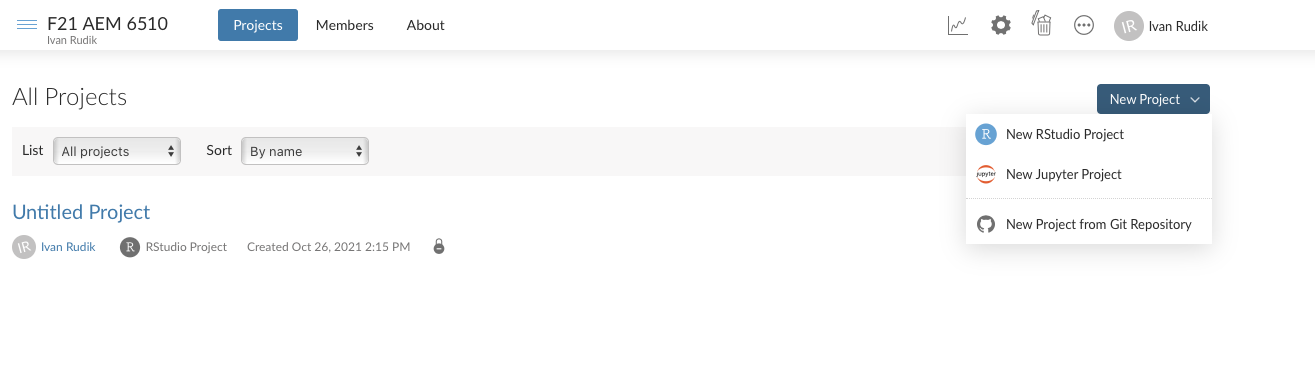 --- # Getting started: wait for deployment 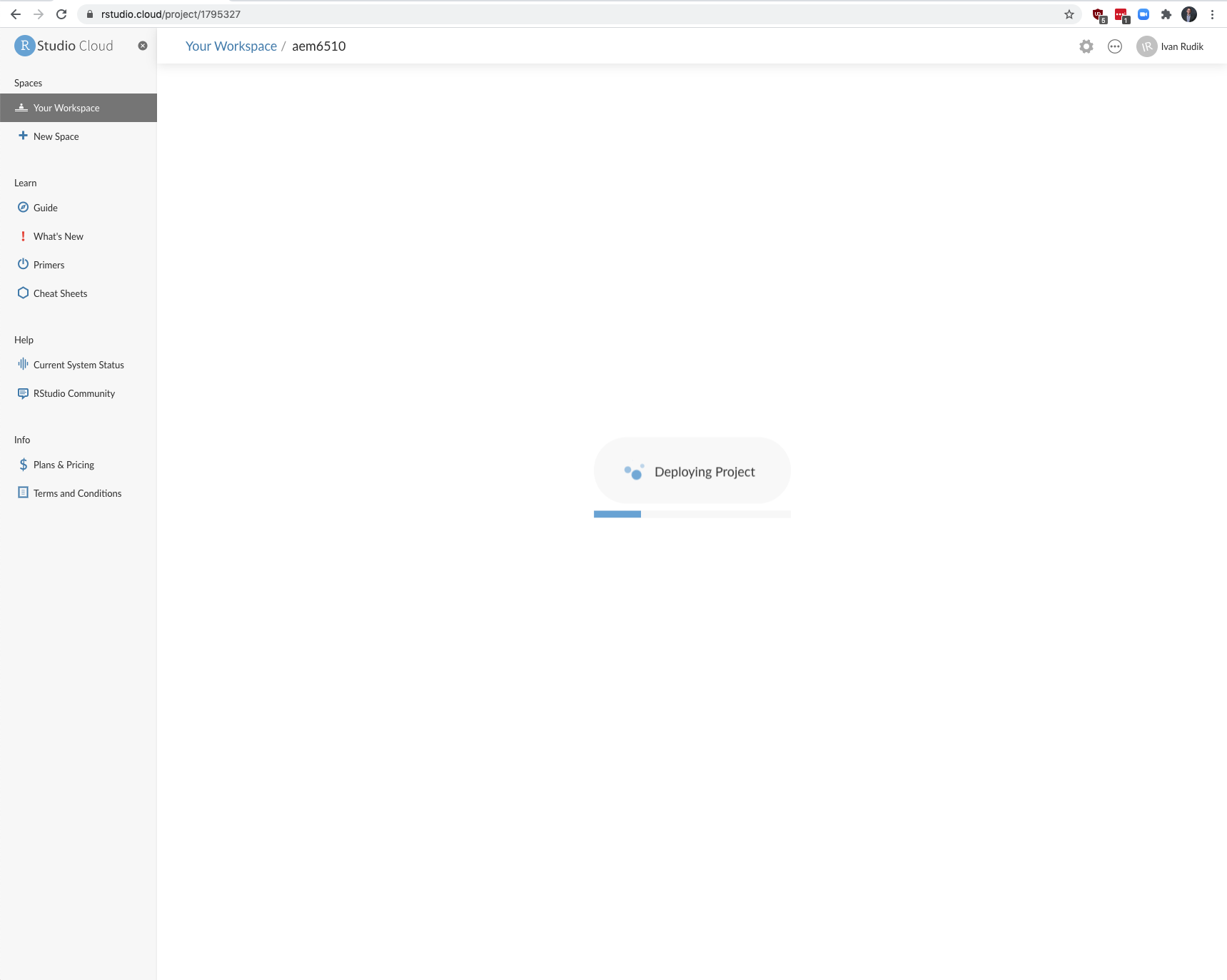 --- # Click on class-code.Rproj 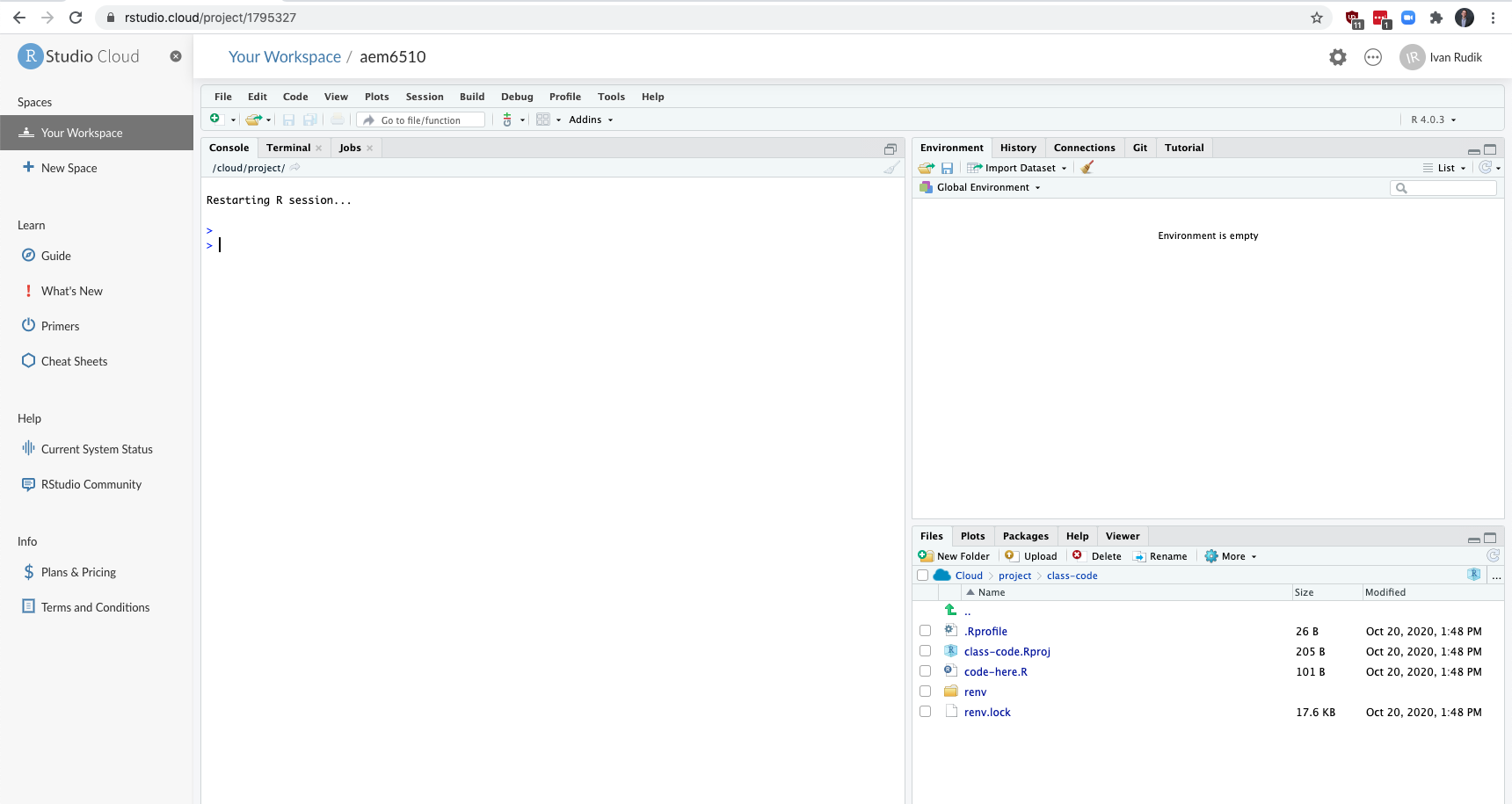 --- # Click yes <img src="files/open_project.png" width="2281" style="display: block; margin: auto;" /> --- class: inverse, center, middle name: r # Quick intro to R <html><div style='float:left'></div><hr color='#EB811B' size=1px width=796px></html> --- # Arithmetic operations R can do all the standard arithmetic operations ```r 1+2 ## add ``` ``` ## [1] 3 ``` ```r 6-7 ## subtract ``` ``` ## [1] -1 ``` ```r 5/2 ## divide ``` ``` ## [1] 2.5 ``` --- # Logical operations You also have logical operations ```r 1 > 2 ``` ``` ## [1] FALSE ``` ```r (1 > 2) | (1 > 0.5) # | is the or operator ``` ``` ## [1] TRUE ``` ```r (1 > 2) & (1 > 0.5) # & is the and operator ``` ``` ## [1] FALSE ``` --- # Logical operations We can negate expressions with: `!` This is helpful for filtering data ```r is.na(1:10) ``` ``` ## [1] FALSE FALSE FALSE FALSE FALSE FALSE FALSE FALSE FALSE FALSE ``` ```r !is.na(1:10) ``` ``` ## [1] TRUE TRUE TRUE TRUE TRUE TRUE TRUE TRUE TRUE TRUE ``` --- # Logical operators For value matching we use: `%in%` To see whether an object is contained within (i.e. matches one of) a list of items, use `%in%`. ```r 4 %in% 1:10 ``` ``` ## [1] TRUE ``` ```r 4 %in% 5:10 ``` ``` ## [1] FALSE ``` This is kind of like an `any` command in other languages --- # Logical operators To evaluate whether two expressions are equal, we need to use .hi-red[two] equal signs ```r 1 = 1 ## This doesn't work ``` ``` ## Error in 1 = 1: invalid (do_set) left-hand side to assignment ``` ```r 1 == 1 ## This does. ``` ``` ## [1] TRUE ``` ```r 1 != 2 ## Note the single equal sign when combined with a negation. ``` ``` ## [1] TRUE ``` --- # Assignment In R, we can use either `=` or `<-` to handle assignment.<sup>1</sup> .footnote[ <sup>1</sup> The `<-` is really a `<` followed by a `-`. It just looks like an arrow because of the font on the slides. ] -- You can think of it as a (left-facing) arrow saying .hi[assign in this direction] --- # Assignment ```r a <- 10 + 5 a ``` ``` ## [1] 15 ``` --- # Assignment You can also use `=` for assignment ```r b = 10 + 10 b ``` ``` ## [1] 20 ``` --- # Which assignment operator to use? Most R folks prefer `<-` for assignment .footnote[In RStudio you can assign `<-` to a hotkey to make using it as easy as `=`] -- `=` has a specific role for evaluation *within* functions too -- It doesn't really matter though, other languages use `=` for both -- Use whatever you prefer, just be consistent --- # Help If you are struggling with a (named) function or object in R, simply type `?commandhere` ```R ?Negate ``` --- # Help Also try `vignette()` for a more detailed introduction to many packages ```R # Try this: vignette("dplyr") ``` -- Vignettes are a very easy way to learn how and when to use a package --- # What are objects? We won't go into OOP details but here are some objects that we'll be working with regularly: - vectors - matrices - data frames - lists - functions - etc. -- A lot of these are probably familiar if you have coding experience -- But there are always language-specific features/subtleties --- # Global environment ```r ## Create a small data frame called "df". df <- data.frame(x = 1:2, y = 3:4) df ``` ``` ## x y ## 1 1 3 ## 2 2 4 ``` -- Now, let's try to run a regression<sup>1</sup> on these "x" and "y" variables: .footnote[ <sup>1</sup> Yes, this is a dumb regression with perfectly co-linear variables. Just go with it. ] --- # Global environment ```r lm(y ~ x) ## The "lm" stands for linear model(s) ``` --- # Global environment ```r lm(y ~ x) ## The "lm" stands for linear model(s) ``` ``` ## Error in eval(predvars, data, env): object 'y' not found ``` -- Error? --- # Global environment The error message is ``` *## Error in eval(predvars, data, env): object 'y' not found ``` -- R can't find the variables that we've supplied in our [Global Environment](https://www.datamentor.io/r-programming/environment-scope/) -- Can you find x or y in the RStudio panel? --- # Global environment We have to tell R `x` and `y` are a part of the object `df` -- How? -- There are a various ways to solve this problem. One is to simply specify the datasource: ```r lm(y ~ x, data = df) ## Works when we add "data = df"! ``` ``` ## ## Call: ## lm(formula = y ~ x, data = df) ## ## Coefficients: ## (Intercept) x ## 2 1 ``` --- # Global environment: why it matters This matters largely for Stata users -- In Stata, the workspace is basically just a single data frame `\(\Rightarrow\)` all variables are in the global environment -- Big problem with this is you can't have multiple data frames / datasets in memory --- # Working with multiple objects We can create a second data frame in memory! ```r df2 <- data.frame(x = rnorm(10), y = runif(10)) df ``` ``` ## x y ## 1 1 3 ## 2 2 4 ``` ```r df2 ``` ``` ## x y ## 1 -0.613382890 0.2259774 ## 2 0.130896371 0.2824887 ## 3 -0.905843002 0.2304107 ## 4 -1.136636840 0.6197059 ## 5 1.131662783 0.1040578 ## 6 -0.009838234 0.6782971 ## 7 0.065605249 0.5581162 ## 8 -1.625401072 0.5701138 ## 9 0.024331984 0.6598609 ## 10 1.251100904 0.2718662 ``` --- # Indexing How do we index in R? -- We've already seen an example of indexing in the form of R console output: ```r 1+2 ``` ``` ## [1] 3 ``` The `[1]` above denotes the first (and, in this case, only) element of our output.<sup>1</sup> -- In this case, a vector of length one equal to the value "3" --- # Indexing Try the following in your console to see a more explicit example of indexed output: ```r rnorm(n = 100, mean = 0, sd = 1) ``` ``` ## [1] 0.30361622 -0.57146408 -0.30867380 -0.40955540 0.04517408 0.10430013 ## [7] 0.17380547 -0.95164107 -0.51172648 -0.22425068 1.33458580 1.15499579 ## [13] 2.05312828 0.17165531 -0.18688468 0.58631875 0.13221947 -0.28582323 ## [19] 0.72600767 0.71954104 0.61187714 -0.59878087 -0.97809484 -1.32639439 ## [25] 0.11650066 0.15587925 -1.57710485 2.50351974 -0.37321754 2.17030535 ## [31] 0.01364178 0.19554214 0.47548680 0.77800681 -1.82338236 0.06250832 ## [37] 1.12761918 0.51172542 -1.13028292 0.66446996 0.19853222 0.53383038 ## [43] -0.62655535 -2.46440515 -0.59379352 1.31853678 1.34202967 0.01819441 ## [49] 0.64271498 -0.71066687 0.87527370 -0.44845575 -1.13081044 0.56774060 ## [55] -0.97787131 -1.03423017 -0.98067760 -0.14674311 0.53411563 0.10658554 ## [61] -0.46979377 -0.46079817 -1.01536509 0.82698389 -1.40094348 -0.67181277 ## [67] -0.08459309 1.15130433 0.03260988 -0.26004754 -1.31336998 -0.42364185 ## [73] 0.85063648 -0.06952117 -0.48511227 -0.77896876 -0.22249120 -0.56392488 ## [79] 0.74349573 -0.99275277 -1.78652358 -0.13506962 0.89185660 0.04830713 ## [85] 1.01875537 -1.07616400 0.99824605 0.08558590 -0.48476381 0.41162871 ## [91] 0.24840219 0.20797661 0.09745577 -0.35552930 0.82781314 -3.01664460 ## [97] -0.42609937 1.62370261 -0.10834918 -1.10200349 ``` --- # Indexing: [] We can also use `[]` to index objects that we create in R. ```r a <- 11:20 a ``` ``` ## [1] 11 12 13 14 15 16 17 18 19 20 ``` ```r a[4] ## Get the 4th element of object "a" ``` ``` ## [1] 14 ``` ```r a[c(4, 6)] ## Get the 4th and 6th elements ``` ``` ## [1] 14 16 ``` --- # Indexing: [] It also works on larger arrays (vectors, matrices, data frames, and lists). For example: ```r starwars[1, 1] ## Show the cell corresponding to the 1st row & 1st column of the data frame. ``` ``` ## # A tibble: 1 x 1 ## name ## <chr> ## 1 Luke Skywalker ``` -- What does `starwars[1:3, 1]` give you? --- # Indexing: [] We haven't covered them properly yet, but .hi-blue[lists] are a more complex type of array object in R -- They can contain a random assortment of objects that don't share the same characteristics -- - e.g. a list can contain a scalar, a string, and a data frame, or even another list --- # Indexing: [] The relevance to indexing is that lists require two square brackets `[[]]` to index the parent list item and then the standard `[]` within that parent item: ```r my_list <- list( a = "hello", b = c(1,2,3), c = data.frame(x = 1:5, y = 6:10) ) my_list[[1]] ## Return the 1st list object ``` ``` ## [1] "hello" ``` ```r my_list[[2]][3] ## Return the 3rd element of the 2nd list object ``` ``` ## [1] 3 ``` --- # Indexing: $ Lists provide a nice segue to our other indexing operator: `$` - Let's continue with the `my_list` example from the previous slide. ```r my_list ``` ``` ## $a ## [1] "hello" ## ## $b ## [1] 1 2 3 ## ## $c ## x y ## 1 1 6 ## 2 2 7 ## 3 3 8 ## 4 4 9 ## 5 5 10 ``` --- count: false # Indexing: $ Lists provide a nice segue to our other indexing operator: `$`. - Let's continue with the `my_list` example ```r my_list ``` ``` *## $a ## [1] "hello" ## *## $b ## [1] 1 2 3 ## *## $c ## x y ## 1 1 6 ## 2 2 7 ## 3 3 8 ## 4 4 9 ## 5 5 10 ``` Notice how our (named) parent list objects are demarcated: "$a", "$b" and "$c". --- # Indexing: $ We can call these objects directly by name using the dollar sign, e.g. ```r my_list$a ## Return list object "a" ``` ``` ## [1] "hello" ``` ```r my_list$b[3] ## Return the 3rd element of list object "b" ``` ``` ## [1] 3 ``` ```r my_list$c$x ## Return column "x" of list object "c" ``` ``` ## [1] 1 2 3 4 5 ``` --- # Indexing: $ The `$` form of indexing also works for other object types In some cases, you can also combine the two index options: ```r starwars$name[1] # first element of the name column of the starwars data frame ``` ``` ## [1] "Luke Skywalker" ``` --- # Indexing: $ However, note some key differences between the output from this example and that of our previous `starwars[1, 1]` example: ```r starwars$name[1] ``` ``` ## [1] "Luke Skywalker" ``` ```r starwars[1, 1] ``` ``` ## # A tibble: 1 x 1 ## name ## <chr> ## 1 Luke Skywalker ``` --- # Removing objects Use `rm()` to remove an object or objects from your working environment. ```r a <- "hello" b <- "world" rm(a, b) ``` You can also use `rm(list = ls())` to remove all objects in your working environment (except packages), but this is [frowned upon](https://www.tidyverse.org/articles/2017/12/workflow-vs-script/) -- Just start a new R session instead --- class: inverse, center, middle name: tidyverse # The tidyverse <html><div style='float:left'></div><hr color='#EB811B' size=1px width=796px></html> --- # What is "tidy" data? Resources: - [Vignette](https://cran.r-project.org/web/packages/tidyr/vignettes/tidy-data.html) (from the **tidyr** package) - [Original paper](https://vita.had.co.nz/papers/tidy-data.pdf) (Hadley Wickham, 2014 JSS) -- Key points: 1. Each variable forms a column. 2. Each observation forms a row. 3. Each type of observational unit forms a table. -- Basically, tidy data is more likely to be [long (i.e. narrow)](https://en.wikipedia.org/wiki/Wide_and_narrow_data) than wide --- # Checklist Install tidyverse: `install.packages('tidyverse')` Install nycflights13: `install.packages('nycflights13', repos = 'https://cran.rstudio.com')` --- # Tidyverse vs. base R Lots of debate over tidyverse vs base R -- The answer is [obvious](http://varianceexplained.org/r/teach-tidyverse/): We should teach the tidyverse first - Good documentation and support - Consistent philosophy and syntax - Nice front-end for big data tools - For data cleaning, plotting, the tidyverse is elite --- # Tidyverse vs. base R Base R is still great - Base R is extremely flexible and powerful - The tidyverse can't do everything - Using base R and the tidyverse together is often a good idea --- # Tidyverse vs. base R One point of convenience is that there is often a direct correspondence between a tidyverse command and its base R equivalent: | tidyverse | base | |---|---| | `?readr::read_csv` | `?utils::read.csv` | | `?dplyr::if_else` | `?base::ifelse` | | `?tibble::tibble` | `?base::data.frame` | Tidyverse functions typically have extra features on top of base R -- There are always many ways to achieve a single goal in R --- # Tidyverse packages Let's load the tidyverse meta-package and check the output. ```r library(tidyverse) ``` -- We have actually loaded a number of packages: **ggplot2**, **tibble**, **dplyr**, etc -- We can also see information about the package versions and some [namespace conflicts](https://raw.githack.com/uo-ec607/lectures/master/04-rlang/04-rlang.html#59) --- # Tidyverse packages The tidyverse actually comes with a lot more packages than those that are just loaded automatically ```r tidyverse_packages() ``` ``` ## [1] "broom" "cli" "crayon" "dbplyr" "dplyr" ## [6] "forcats" "ggplot2" "haven" "hms" "httr" ## [11] "jsonlite" "lubridate" "magrittr" "modelr" "pillar" ## [16] "purrr" "readr" "readxl" "reprex" "rlang" ## [21] "rstudioapi" "rvest" "stringr" "tibble" "tidyr" ## [26] "xml2" "tidyverse" ``` e.g. the **lubridate** package is for working with dates and the **rvest** package is for webscraping -- These packages have to be loaded separately --- # Tidyverse packages We're going to focus on two workhorse packages: 1. [**dplyr**](https://dplyr.tidyverse.org/) 2. [**tidyr**](https://tidyr.tidyverse.org/) These are the packages for cleaning and wrangling data -- They are thus the ones that you will likely make the most use of -- Data cleaning and wrangling occupies an inordinate amount of time, no matter where you are in your research career --- # Pipes: %>% The pipe operator `%>%` lets us perform a sequence of operations in a very nice and tidy way -- Suppose we wanted to figure out the average highway miles per gallon of Audi's in the `mpg` dataset: ```r mpg ``` ``` ## # A tibble: 234 x 11 ## manufacturer model displ year cyl trans drv cty hwy fl class ## <chr> <chr> <dbl> <int> <int> <chr> <chr> <int> <int> <chr> <chr> ## 1 audi a4 1.8 1999 4 auto(l… f 18 29 p comp… ## 2 audi a4 1.8 1999 4 manual… f 21 29 p comp… ## 3 audi a4 2 2008 4 manual… f 20 31 p comp… ## 4 audi a4 2 2008 4 auto(a… f 21 30 p comp… ## 5 audi a4 2.8 1999 6 auto(l… f 16 26 p comp… ## 6 audi a4 2.8 1999 6 manual… f 18 26 p comp… ## 7 audi a4 3.1 2008 6 auto(a… f 18 27 p comp… ## 8 audi a4 quat… 1.8 1999 4 manual… 4 18 26 p comp… ## 9 audi a4 quat… 1.8 1999 4 auto(l… 4 16 25 p comp… ## 10 audi a4 quat… 2 2008 4 manual… 4 20 28 p comp… ## # … with 224 more rows ``` --- # Pipes: %>% There's two ways you might do this without taking advantage of pipes: -- The first is to do it step-by-step, line-by-line which requires a lot of variable assignment ```r audis_mpg <- filter(mpg, manufacturer=="audi") audis_mpg_grouped <- group_by(filter(mpg, manufacturer=="audi"), model) summarise(audis_mpg_grouped, hwy_mean = mean(hwy)) ``` ``` ## # A tibble: 3 x 2 ## model hwy_mean ## <chr> <dbl> ## 1 a4 28.3 ## 2 a4 quattro 25.8 ## 3 a6 quattro 24 ``` --- # Pipes: %>% Next you could do it all in one line which is hard to read ```r summarise(group_by(filter(mpg, manufacturer=="audi"), model), hwy_mean = mean(hwy)) ``` ``` ## # A tibble: 3 x 2 ## model hwy_mean ## <chr> <dbl> ## 1 a4 28.3 ## 2 a4 quattro 25.8 ## 3 a6 quattro 24 ``` --- # Pipes: %>% Or, you could use .hi-blue[pipes] `%>%`: ```r mpg %>% filter(manufacturer=="audi") %>% group_by(model) %>% summarise(hwy_mean = mean(hwy)) ``` ``` ## # A tibble: 3 x 2 ## model hwy_mean ## <chr> <dbl> ## 1 a4 28.3 ## 2 a4 quattro 25.8 ## 3 a6 quattro 24 ``` -- It performs the operations from left to right, exactly like you'd think of them: take this object (mpg), do this (filter), then do this (group by car model), then do this (take the mean of highway miles) --- # Use vertical space Pipes are even more readable if we write it over several lines: ```r mpg %>% filter(manufacturer=="audi") %>% group_by(model) %>% summarise(hwy_mean = mean(hwy)) ``` ``` ## # A tibble: 3 x 2 ## model hwy_mean ## <chr> <dbl> ## 1 a4 28.3 ## 2 a4 quattro 25.8 ## 3 a6 quattro 24 ``` Using vertical space costs nothing and makes for much more readable code --- class: inverse, center, middle name: dplyr # dplyr <html><div style='float:left'></div><hr color='#EB811B' size=1px width=796px></html> --- # Aside: dplyr 1.0.0 release Please make sure that you are running at least **dplyr** 1.0.0 before continuing. ```r packageVersion('dplyr') ``` ``` ## [1] '1.0.5' ``` ```r # install.packages('dplyr') ## install updated version if < 1.0.0 ``` --- # The five key dplyr verbs 1. `filter`: Subset/filter rows based on their values 2. `arrange`: Reorder/arrange rows based on their values 3. `select`: Select columns/variables 4. `mutate`: Create new columns/variables 5. `summarise`: Collapse multiple rows into a single summary value, potentially by a grouping variable -- Let's practice these commands together using the `starwars` data frame that comes pre-packaged with dplyr --- # Starwars Here's the `starwars` dataset, it has 87 observations of 14 variables ```r starwars ``` ``` ## # A tibble: 87 x 14 ## name height mass hair_color skin_color eye_color birth_year sex gender ## <chr> <int> <dbl> <chr> <chr> <chr> <dbl> <chr> <chr> ## 1 Luke S… 172 77 blond fair blue 19 male mascu… ## 2 C-3PO 167 75 <NA> gold yellow 112 none mascu… ## 3 R2-D2 96 32 <NA> white, bl… red 33 none mascu… ## 4 Darth … 202 136 none white yellow 41.9 male mascu… ## 5 Leia O… 150 49 brown light brown 19 fema… femin… ## 6 Owen L… 178 120 brown, grey light blue 52 male mascu… ## 7 Beru W… 165 75 brown light blue 47 fema… femin… ## 8 R5-D4 97 32 <NA> white, red red NA none mascu… ## 9 Biggs … 183 84 black light brown 24 male mascu… ## 10 Obi-Wa… 182 77 auburn, wh… fair blue-gray 57 male mascu… ## # … with 77 more rows, and 5 more variables: homeworld <chr>, species <chr>, ## # films <list>, vehicles <list>, starships <list> ``` --- # 1) dplyr::filter Here we are subsetting the observations of humans that are at least 190cm ```r starwars %>% filter( species == "Human", height >= 190 ) ``` ``` ## # A tibble: 4 x 14 ## name height mass hair_color skin_color eye_color birth_year sex gender ## <chr> <int> <dbl> <chr> <chr> <chr> <dbl> <chr> <chr> ## 1 Darth Va… 202 136 none white yellow 41.9 male mascu… ## 2 Qui-Gon … 193 89 brown fair blue 92 male mascu… ## 3 Dooku 193 80 white fair brown 102 male mascu… ## 4 Bail Pre… 191 NA black tan brown 67 male mascu… ## # … with 5 more variables: homeworld <chr>, species <chr>, films <list>, ## # vehicles <list>, starships <list> ``` --- # 1) dplyr::filter You can filter using regular expressions with grep-type commands or the `stringr` package ```r starwars %>% filter(stringr::str_detect(name, "Skywalker")) ``` ``` ## # A tibble: 3 x 14 ## name height mass hair_color skin_color eye_color birth_year sex gender ## <chr> <int> <dbl> <chr> <chr> <chr> <dbl> <chr> <chr> ## 1 Luke Sk… 172 77 blond fair blue 19 male mascu… ## 2 Anakin … 188 84 blond fair blue 41.9 male mascu… ## 3 Shmi Sk… 163 NA black fair brown 72 female femin… ## # … with 5 more variables: homeworld <chr>, species <chr>, films <list>, ## # vehicles <list>, starships <list> ``` This subsets the observations for individuals whose names contain "Skywalker" --- # 1) dplyr::filter A very common `filter` use case is identifying/removing missing data cases: ```r starwars %>% filter(is.na(height)) ``` ``` ## # A tibble: 6 x 14 ## name height mass hair_color skin_color eye_color birth_year sex gender ## <chr> <int> <dbl> <chr> <chr> <chr> <dbl> <chr> <chr> ## 1 Arvel C… NA NA brown fair brown NA male mascu… ## 2 Finn NA NA black dark dark NA male mascu… ## 3 Rey NA NA brown light hazel NA female femin… ## 4 Poe Dam… NA NA brown light brown NA male mascu… ## 5 BB8 NA NA none none black NA none mascu… ## 6 Captain… NA NA unknown unknown unknown NA <NA> <NA> ## # … with 5 more variables: homeworld <chr>, species <chr>, films <list>, ## # vehicles <list>, starships <list> ``` --- # 1) dplyr::filter To remove missing observations, use negation: ```r starwars %>% filter(!is.na(height)) ``` ``` ## # A tibble: 81 x 14 ## name height mass hair_color skin_color eye_color birth_year sex gender ## <chr> <int> <dbl> <chr> <chr> <chr> <dbl> <chr> <chr> ## 1 Luke S… 172 77 blond fair blue 19 male mascu… ## 2 C-3PO 167 75 <NA> gold yellow 112 none mascu… ## 3 R2-D2 96 32 <NA> white, bl… red 33 none mascu… ## 4 Darth … 202 136 none white yellow 41.9 male mascu… ## 5 Leia O… 150 49 brown light brown 19 fema… femin… ## 6 Owen L… 178 120 brown, grey light blue 52 male mascu… ## 7 Beru W… 165 75 brown light blue 47 fema… femin… ## 8 R5-D4 97 32 <NA> white, red red NA none mascu… ## 9 Biggs … 183 84 black light brown 24 male mascu… ## 10 Obi-Wa… 182 77 auburn, wh… fair blue-gray 57 male mascu… ## # … with 71 more rows, and 5 more variables: homeworld <chr>, species <chr>, ## # films <list>, vehicles <list>, starships <list> ``` --- # 2) dplyr::arrange `arrange` sorts the data frame based on the variables you supply: ```r starwars %>% arrange(birth_year) ``` ``` ## # A tibble: 87 x 14 ## name height mass hair_color skin_color eye_color birth_year sex gender ## <chr> <int> <dbl> <chr> <chr> <chr> <dbl> <chr> <chr> ## 1 Wicket … 88 20 brown brown brown 8 male mascu… ## 2 IG-88 200 140 none metal red 15 none mascu… ## 3 Luke Sk… 172 77 blond fair blue 19 male mascu… ## 4 Leia Or… 150 49 brown light brown 19 fema… femin… ## 5 Wedge A… 170 77 brown fair hazel 21 male mascu… ## 6 Plo Koon 188 80 none orange black 22 male mascu… ## 7 Biggs D… 183 84 black light brown 24 male mascu… ## 8 Han Solo 180 80 brown fair brown 29 male mascu… ## 9 Lando C… 177 79 black dark brown 31 male mascu… ## 10 Boba Fe… 183 78.2 black fair brown 31.5 male mascu… ## # … with 77 more rows, and 5 more variables: homeworld <chr>, species <chr>, ## # films <list>, vehicles <list>, starships <list> ``` --- # 2) dplyr::arrange We can also arrange items in descending order using `arrange(desc())` ```r starwars %>% arrange(desc(birth_year)) ``` ``` ## # A tibble: 87 x 14 ## name height mass hair_color skin_color eye_color birth_year sex gender ## <chr> <int> <dbl> <chr> <chr> <chr> <dbl> <chr> <chr> ## 1 Yoda 66 17 white green brown 896 male mascu… ## 2 Jabba … 175 1358 <NA> green-tan,… orange 600 herm… mascu… ## 3 Chewba… 228 112 brown unknown blue 200 male mascu… ## 4 C-3PO 167 75 <NA> gold yellow 112 none mascu… ## 5 Dooku 193 80 white fair brown 102 male mascu… ## 6 Qui-Go… 193 89 brown fair blue 92 male mascu… ## 7 Ki-Adi… 198 82 white pale yellow 92 male mascu… ## 8 Finis … 170 NA blond fair blue 91 male mascu… ## 9 Palpat… 170 75 grey pale yellow 82 male mascu… ## 10 Cliegg… 183 NA brown fair blue 82 male mascu… ## # … with 77 more rows, and 5 more variables: homeworld <chr>, species <chr>, ## # films <list>, vehicles <list>, starships <list> ``` --- # 3) dplyr::select Use commas to select multiple columns out of a data frame, deselect a column with "-", select across multiple columns with "first:last": ```r starwars %>% select(name:skin_color, species, -height) ``` ``` ## # A tibble: 87 x 5 ## name mass hair_color skin_color species ## <chr> <dbl> <chr> <chr> <chr> ## 1 Luke Skywalker 77 blond fair Human ## 2 C-3PO 75 <NA> gold Droid ## 3 R2-D2 32 <NA> white, blue Droid ## 4 Darth Vader 136 none white Human ## 5 Leia Organa 49 brown light Human ## 6 Owen Lars 120 brown, grey light Human ## 7 Beru Whitesun lars 75 brown light Human ## 8 R5-D4 32 <NA> white, red Droid ## 9 Biggs Darklighter 84 black light Human ## 10 Obi-Wan Kenobi 77 auburn, white fair Human ## # … with 77 more rows ``` --- # 3) dplyr::select You can also rename your selected variables in place ```r starwars %>% select(alias = name, crib = homeworld) ``` ``` ## # A tibble: 87 x 2 ## alias crib ## <chr> <chr> ## 1 Luke Skywalker Tatooine ## 2 C-3PO Tatooine ## 3 R2-D2 Naboo ## 4 Darth Vader Tatooine ## 5 Leia Organa Alderaan ## 6 Owen Lars Tatooine ## 7 Beru Whitesun lars Tatooine ## 8 R5-D4 Tatooine ## 9 Biggs Darklighter Tatooine ## 10 Obi-Wan Kenobi Stewjon ## # … with 77 more rows ``` --- # 3) dplyr::select If you just want to rename columns without subsetting them, you can use `rename`: ```r starwars %>% rename(alias = name, crib = homeworld) ``` ``` ## # A tibble: 87 x 14 ## alias height mass hair_color skin_color eye_color birth_year sex gender ## <chr> <int> <dbl> <chr> <chr> <chr> <dbl> <chr> <chr> ## 1 Luke S… 172 77 blond fair blue 19 male mascu… ## 2 C-3PO 167 75 <NA> gold yellow 112 none mascu… ## 3 R2-D2 96 32 <NA> white, bl… red 33 none mascu… ## 4 Darth … 202 136 none white yellow 41.9 male mascu… ## 5 Leia O… 150 49 brown light brown 19 fema… femin… ## 6 Owen L… 178 120 brown, grey light blue 52 male mascu… ## 7 Beru W… 165 75 brown light blue 47 fema… femin… ## 8 R5-D4 97 32 <NA> white, red red NA none mascu… ## 9 Biggs … 183 84 black light brown 24 male mascu… ## 10 Obi-Wa… 182 77 auburn, wh… fair blue-gray 57 male mascu… ## # … with 77 more rows, and 5 more variables: crib <chr>, species <chr>, ## # films <list>, vehicles <list>, starships <list> ``` --- # 3) dplyr::select *cont.* The `select(contains(PATTERN))` option provides a nice shortcut in relevant cases. ```r starwars %>% select(name, contains("color")) ``` ``` ## # A tibble: 87 x 4 ## name hair_color skin_color eye_color ## <chr> <chr> <chr> <chr> ## 1 Luke Skywalker blond fair blue ## 2 C-3PO <NA> gold yellow ## 3 R2-D2 <NA> white, blue red ## 4 Darth Vader none white yellow ## 5 Leia Organa brown light brown ## 6 Owen Lars brown, grey light blue ## 7 Beru Whitesun lars brown light blue ## 8 R5-D4 <NA> white, red red ## 9 Biggs Darklighter black light brown ## 10 Obi-Wan Kenobi auburn, white fair blue-gray ## # … with 77 more rows ``` --- # 3) dplyr::select The `select(..., everything())` option is another useful shortcut if you only want to bring some variable(s) to the "front" of a data frame ```r starwars %>% select(species, homeworld, everything()) %>% head(5) ``` ``` ## # A tibble: 5 x 14 ## species homeworld name height mass hair_color skin_color eye_color ## <chr> <chr> <chr> <int> <dbl> <chr> <chr> <chr> ## 1 Human Tatooine Luke Skywalker 172 77 blond fair blue ## 2 Droid Tatooine C-3PO 167 75 <NA> gold yellow ## 3 Droid Naboo R2-D2 96 32 <NA> white, blue red ## 4 Human Tatooine Darth Vader 202 136 none white yellow ## 5 Human Alderaan Leia Organa 150 49 brown light brown ## # … with 6 more variables: birth_year <dbl>, sex <chr>, gender <chr>, ## # films <list>, vehicles <list>, starships <list> ``` --- # 3) dplyr::select You can also use `relocate` to do the same thing ```r starwars %>% relocate(species, homeworld) %>% head(5) ``` ``` ## # A tibble: 5 x 14 ## species homeworld name height mass hair_color skin_color eye_color ## <chr> <chr> <chr> <int> <dbl> <chr> <chr> <chr> ## 1 Human Tatooine Luke Skywalker 172 77 blond fair blue ## 2 Droid Tatooine C-3PO 167 75 <NA> gold yellow ## 3 Droid Naboo R2-D2 96 32 <NA> white, blue red ## 4 Human Tatooine Darth Vader 202 136 none white yellow ## 5 Human Alderaan Leia Organa 150 49 brown light brown ## # … with 6 more variables: birth_year <dbl>, sex <chr>, gender <chr>, ## # films <list>, vehicles <list>, starships <list> ``` --- # 4) dplyr::mutate You can create new columns from scratch as transformations of existing columns: ```r starwars %>% select(name, birth_year) %>% mutate(dog_years = birth_year * 7) %>% mutate(comment = paste0(name, " is ", dog_years, " in dog years.")) ``` ``` ## # A tibble: 87 x 4 ## name birth_year dog_years comment ## <chr> <dbl> <dbl> <chr> ## 1 Luke Skywalker 19 133 Luke Skywalker is 133 in dog years. ## 2 C-3PO 112 784 C-3PO is 784 in dog years. ## 3 R2-D2 33 231 R2-D2 is 231 in dog years. ## 4 Darth Vader 41.9 293. Darth Vader is 293.3 in dog years. ## 5 Leia Organa 19 133 Leia Organa is 133 in dog years. ## 6 Owen Lars 52 364 Owen Lars is 364 in dog years. ## 7 Beru Whitesun lars 47 329 Beru Whitesun lars is 329 in dog yea… ## 8 R5-D4 NA NA R5-D4 is NA in dog years. ## 9 Biggs Darklighter 24 168 Biggs Darklighter is 168 in dog year… ## 10 Obi-Wan Kenobi 57 399 Obi-Wan Kenobi is 399 in dog years. ## # … with 77 more rows ``` --- # 4) dplyr::mutate *Note:* `mutate` creates variables in order, so you can chain multiple mutates in a single call ```r starwars %>% select(name, birth_year) %>% mutate( dog_years = birth_year * 7, ## Separate with a comma comment = paste0(name, " is ", dog_years, " in dog years.") ) ``` ``` ## # A tibble: 87 x 4 ## name birth_year dog_years comment ## <chr> <dbl> <dbl> <chr> ## 1 Luke Skywalker 19 133 Luke Skywalker is 133 in dog years. ## 2 C-3PO 112 784 C-3PO is 784 in dog years. ## 3 R2-D2 33 231 R2-D2 is 231 in dog years. ## 4 Darth Vader 41.9 293. Darth Vader is 293.3 in dog years. ## 5 Leia Organa 19 133 Leia Organa is 133 in dog years. ## 6 Owen Lars 52 364 Owen Lars is 364 in dog years. ## 7 Beru Whitesun lars 47 329 Beru Whitesun lars is 329 in dog yea… ## 8 R5-D4 NA NA R5-D4 is NA in dog years. ## 9 Biggs Darklighter 24 168 Biggs Darklighter is 168 in dog year… ## 10 Obi-Wan Kenobi 57 399 Obi-Wan Kenobi is 399 in dog years. ## # … with 77 more rows ``` --- # 4) dplyr::mutate Boolean, logical and conditional operators all work well with `mutate` too: ```r starwars %>% select(name, height) %>% filter(name %in% c("Luke Skywalker", "Anakin Skywalker")) %>% mutate(tall1 = height > 180) %>% # TRUE or FALSE mutate(tall2 = ifelse(height > 180, "Tall", "Short")) ## Same effect, but can choose labels ``` ``` ## # A tibble: 2 x 4 ## name height tall1 tall2 ## <chr> <int> <lgl> <chr> ## 1 Luke Skywalker 172 FALSE Short ## 2 Anakin Skywalker 188 TRUE Tall ``` --- # 4) dplyr::mutate Lastly, combining `mutate` with `across` allows you to easily work on a subset of variables: ```r starwars %>% select(name:eye_color) %>% mutate(across(where(is.character), toupper)) %>% # Take all character variables, uppercase them head(5) ``` ``` ## # A tibble: 5 x 6 ## name height mass hair_color skin_color eye_color ## <chr> <int> <dbl> <chr> <chr> <chr> ## 1 LUKE SKYWALKER 172 77 BLOND FAIR BLUE ## 2 C-3PO 167 75 <NA> GOLD YELLOW ## 3 R2-D2 96 32 <NA> WHITE, BLUE RED ## 4 DARTH VADER 202 136 NONE WHITE YELLOW ## 5 LEIA ORGANA 150 49 BROWN LIGHT BROWN ``` --- # 5) dplyr::summarise Summarising useful in combination with the `group_by` command ```r starwars %>% group_by(species, gender) %>% # for each species-gender combo summarise(mean_height = mean(height, na.rm = TRUE)) # calculate the mean height ``` ``` ## # A tibble: 42 x 3 ## # Groups: species [38] ## species gender mean_height ## <chr> <chr> <dbl> ## 1 Aleena masculine 79 ## 2 Besalisk masculine 198 ## 3 Cerean masculine 198 ## 4 Chagrian masculine 196 ## 5 Clawdite feminine 168 ## 6 Droid feminine 96 ## 7 Droid masculine 140 ## 8 Dug masculine 112 ## 9 Ewok masculine 88 ## 10 Geonosian masculine 183 ## # … with 32 more rows ``` --- # 5) dplyr::summarise Note that including "na.rm = TRUE" is usually a good idea with summarise functions, it keeps NAs from propagating to the end result ```r ## Probably not what we want starwars %>% summarise(mean_height = mean(height)) ``` ``` ## # A tibble: 1 x 1 ## mean_height ## <dbl> ## 1 NA ``` --- # 5) dplyr::summarise We can also use `across` within summarise: ```r starwars %>% group_by(species) %>% # for each species summarise(across(where(is.numeric), mean, na.rm = T)) %>% # take the mean of all numeric variables head(5) ``` ``` ## # A tibble: 5 x 4 ## species height mass birth_year ## <chr> <dbl> <dbl> <dbl> ## 1 Aleena 79 15 NaN ## 2 Besalisk 198 102 NaN ## 3 Cerean 198 82 92 ## 4 Chagrian 196 NaN NaN ## 5 Clawdite 168 55 NaN ``` --- # Other dplyr goodies `group_by` and `ungroup`: For (un)grouping - Particularly useful with the `summarise` and `mutate` commands -- `slice`: Subset rows by position rather than filtering by values - E.g. `starwars %>% slice(c(1, 5))` --- # Other dplyr goodies `pull`: Extract a column from as a data frame as a vector or scalar - E.g. `starwars %>% filter(gender=="female") %>% pull(height)` -- `count` and `distinct`: Number and isolate unique observations - E.g. `starwars %>% count(species)`, or `starwars %>% distinct(species)` - You could also use a combination of `mutate`, `group_by`, and `n()`, e.g. `starwars %>% group_by(species) %>% mutate(num = n())`. --- # Other dplyr goodies There are also a whole class of [window functions](https://cran.r-project.org/web/packages/dplyr/vignettes/window-functions.html) for getting leads and lags, percentiles, cumulative sums, etc. - See `vignette("window-functions")`. --- # dplyr::xxxx_join The last set of commands we need are the `join` commands -- These are the same as `merge` in stata but with a bit more functionality --- # dplyr::xxxx_join We merge data with [join operations](https://cran.r-project.org/web/packages/dplyr/vignettes/two-table.html): - `inner_join(df1, df2)` - `left_join(df1, df2)` - `right_join(df1, df2)` - `full_join(df1, df2)` - `semi_join(df1, df2)` - `anti_join(df1, df2)` (You can visualize the operations [here](https://r4ds.had.co.nz/relational-data.html)) --- # dplyr::xxxx_join Lets use the data that comes with the the [nycflights13](http://github.com/hadley/nycflights13) package. ```r library(nycflights13) flights ``` ``` ## # A tibble: 336,776 x 19 ## year month day dep_time sched_dep_time dep_delay arr_time sched_arr_time ## <int> <int> <int> <int> <int> <dbl> <int> <int> ## 1 2013 1 1 517 515 2 830 819 ## 2 2013 1 1 533 529 4 850 830 ## 3 2013 1 1 542 540 2 923 850 ## 4 2013 1 1 544 545 -1 1004 1022 ## 5 2013 1 1 554 600 -6 812 837 ## 6 2013 1 1 554 558 -4 740 728 ## 7 2013 1 1 555 600 -5 913 854 ## 8 2013 1 1 557 600 -3 709 723 ## 9 2013 1 1 557 600 -3 838 846 ## 10 2013 1 1 558 600 -2 753 745 ## # … with 336,766 more rows, and 11 more variables: arr_delay <dbl>, ## # carrier <chr>, flight <int>, tailnum <chr>, origin <chr>, dest <chr>, ## # air_time <dbl>, distance <dbl>, hour <dbl>, minute <dbl>, time_hour <dttm> ``` --- # dplyr::xxxx_join ```r planes ``` ``` ## # A tibble: 3,322 x 9 ## tailnum year type manufacturer model engines seats speed engine ## <chr> <int> <chr> <chr> <chr> <int> <int> <int> <chr> ## 1 N10156 2004 Fixed wing m… EMBRAER EMB-1… 2 55 NA Turbo-… ## 2 N102UW 1998 Fixed wing m… AIRBUS INDUST… A320-… 2 182 NA Turbo-… ## 3 N103US 1999 Fixed wing m… AIRBUS INDUST… A320-… 2 182 NA Turbo-… ## 4 N104UW 1999 Fixed wing m… AIRBUS INDUST… A320-… 2 182 NA Turbo-… ## 5 N10575 2002 Fixed wing m… EMBRAER EMB-1… 2 55 NA Turbo-… ## 6 N105UW 1999 Fixed wing m… AIRBUS INDUST… A320-… 2 182 NA Turbo-… ## 7 N107US 1999 Fixed wing m… AIRBUS INDUST… A320-… 2 182 NA Turbo-… ## 8 N108UW 1999 Fixed wing m… AIRBUS INDUST… A320-… 2 182 NA Turbo-… ## 9 N109UW 1999 Fixed wing m… AIRBUS INDUST… A320-… 2 182 NA Turbo-… ## 10 N110UW 1999 Fixed wing m… AIRBUS INDUST… A320-… 2 182 NA Turbo-… ## # … with 3,312 more rows ``` --- # Joining operations Let's perform a left join on the flights and planes datasets - *Note*: I'm going subset columns after the join, but only to keep text on the slide -- ```r left_join(flights, planes) %>% select(year, month, day, dep_time, arr_time, carrier, flight, tailnum, type, model) ``` ``` ## Joining, by = c("year", "tailnum") ``` ``` ## # A tibble: 336,776 x 10 ## year month day dep_time arr_time carrier flight tailnum type model ## <int> <int> <int> <int> <int> <chr> <int> <chr> <chr> <chr> ## 1 2013 1 1 517 830 UA 1545 N14228 <NA> <NA> ## 2 2013 1 1 533 850 UA 1714 N24211 <NA> <NA> ## 3 2013 1 1 542 923 AA 1141 N619AA <NA> <NA> ## 4 2013 1 1 544 1004 B6 725 N804JB <NA> <NA> ## 5 2013 1 1 554 812 DL 461 N668DN <NA> <NA> ## 6 2013 1 1 554 740 UA 1696 N39463 <NA> <NA> ## 7 2013 1 1 555 913 B6 507 N516JB <NA> <NA> ## 8 2013 1 1 557 709 EV 5708 N829AS <NA> <NA> ## 9 2013 1 1 557 838 B6 79 N593JB <NA> <NA> ## 10 2013 1 1 558 753 AA 301 N3ALAA <NA> <NA> ## # … with 336,766 more rows ``` --- # Joining operations Note that dplyr made a reasonable guess about which columns to join on (i.e. columns that share the same name), and told us what it chose ``` *## Joining, by = c("year", "tailnum") ``` There's an obvious problem here: the variable `year` does not have a consistent meaning across our joining datasets -- In one it refers to the *year of flight*, in the other it refers to *year of construction* Luckily, there's an easy way to avoid this problem: try `?dplyr::join` --- # Joining operations You just need to be more explicit in your join call by using the `by = ` argument ```r left_join( flights, planes %>% rename(year_built = year), ## Not necessary w/ below line, but helpful by = "tailnum" ## Be specific about the joining column ) %>% select(year, month, day, dep_time, arr_time, carrier, flight, tailnum, year_built, type, model) %>% head(3) ## Just to save vertical space on the slide ``` ``` ## # A tibble: 3 x 11 ## year month day dep_time arr_time carrier flight tailnum year_built type ## <int> <int> <int> <int> <int> <chr> <int> <chr> <int> <chr> ## 1 2013 1 1 517 830 UA 1545 N14228 1999 Fixed w… ## 2 2013 1 1 533 850 UA 1714 N24211 1998 Fixed w… ## 3 2013 1 1 542 923 AA 1141 N619AA 1990 Fixed w… ## # … with 1 more variable: model <chr> ``` --- # Joining operations Note what happens if we again specify the join column but don't rename the ambiguous `year`: ```r left_join(flights, planes, ## Not renaming "year" to "year_built" this time by = "tailnum") %>% select(contains("year"), month, day, dep_time, arr_time, carrier, flight, tailnum, type, model) %>% head(3) ``` ``` ## # A tibble: 3 x 11 ## year.x year.y month day dep_time arr_time carrier flight tailnum type model ## <int> <int> <int> <int> <int> <int> <chr> <int> <chr> <chr> <chr> ## 1 2013 1999 1 1 517 830 UA 1545 N14228 Fixe… 737-… ## 2 2013 1998 1 1 533 850 UA 1714 N24211 Fixe… 737-… ## 3 2013 1990 1 1 542 923 AA 1141 N619AA Fixe… 757-… ``` -- Make sure you know what "year.x" and "year.y" are --- class: inverse, center, middle name: tidyr # tidyr <html><div style='float:left'></div><hr color='#EB811B' size=1px width=796px></html> --- # Key tidyr verbs 1. `pivot_longer`: Pivot wide data into long format (i.e. "melt", "reshape long") 2. `pivot_wider`: Pivot long data into wide format (i.e. "cast", "reshape wide") 3. `separate`: Split one column into multiple columns 4. `unite`: Combine multiple columns into one -- Let's practice these verbs together in class --- # 1) tidyr::pivot_longer ```r stocks <- data.frame( time = as.Date('2009-01-01') + 0:1, X = rnorm(2, 0, 1), Y = rnorm(2, 0, 2), Z = rnorm(2, 0, 4) ) stocks ``` ``` ## time X Y Z ## 1 2009-01-01 0.6163028 1.779204 -1.461802 ## 2 2009-01-02 -0.1024888 2.548539 -2.816719 ``` We have 4 variables, the date and the stocks How do we get this in tidy form? --- # 1) tidyr::pivot_longer ```r stocks %>% pivot_longer(-time, names_to = "stock", values_to = "price") ``` We need to pivot the stock name variables `X, Y, Z` longer 1. Choose non-time variables: `-time` 2. Decide what variable holds the names: `names_to = "stock"` 3. Decide what variable holds the values: `values_to = "price"` --- # 1) tidyr::pivot_longer ```r stocks %>% pivot_longer(-time, names_to = "stock", values_to = "price") ``` ``` ## # A tibble: 6 x 3 ## time stock price ## <date> <chr> <dbl> ## 1 2009-01-01 X 0.616 ## 2 2009-01-01 Y 1.78 ## 3 2009-01-01 Z -1.46 ## 4 2009-01-02 X -0.102 ## 5 2009-01-02 Y 2.55 ## 6 2009-01-02 Z -2.82 ``` --- # 1) tidyr::pivot_longer Let's quickly save the "tidy" (i.e. long) stocks data frame for use on the next slide ```r tidy_stocks <- stocks %>% pivot_longer(-time, names_to = "stock", values_to = "price") ``` --- # 2) tidyr::pivot_wider ```r tidy_stocks %>% pivot_wider(names_from = stock, values_from = price) ``` ``` ## # A tibble: 2 x 4 ## time X Y Z ## <date> <dbl> <dbl> <dbl> ## 1 2009-01-01 0.616 1.78 -1.46 ## 2 2009-01-02 -0.102 2.55 -2.82 ``` ```r tidy_stocks %>% pivot_wider(names_from = time, values_from = price) ``` ``` ## # A tibble: 3 x 3 ## stock `2009-01-01` `2009-01-02` ## <chr> <dbl> <dbl> ## 1 X 0.616 -0.102 ## 2 Y 1.78 2.55 ## 3 Z -1.46 -2.82 ``` -- Note that the second example has effectively transposed the data --- # 3) tidyr::separate ```r economists <- data.frame(name = c("Adam.Smith", "Paul.Samuelson", "Milton.Friedman")) economists ``` ``` ## name ## 1 Adam.Smith ## 2 Paul.Samuelson ## 3 Milton.Friedman ``` ```r economists %>% separate(name, c("first_name", "last_name")) ``` ``` ## first_name last_name ## 1 Adam Smith ## 2 Paul Samuelson ## 3 Milton Friedman ``` -- This command is pretty smart. But to avoid ambiguity, you can also specify the separation character with `separate(..., sep=".")` --- # 3) tidyr::separate A related function is `separate_rows`, for splitting up cells that contain multiple fields or observations (a frustratingly common occurence with survey data) ```r jobs <- data.frame( name = c("Jack", "Jill"), occupation = c("Homemaker", "Philosopher, Philanthropist, Troublemaker") ) jobs ``` ``` ## name occupation ## 1 Jack Homemaker ## 2 Jill Philosopher, Philanthropist, Troublemaker ``` --- # 3) tidyr::separate A related function is `separate_rows`, for splitting up cells that contain multiple fields or observations (a frustratingly common occurence with survey data) ```r ## Now split out Jill's various occupations into different rows jobs %>% separate_rows(occupation) ``` ``` ## # A tibble: 4 x 2 ## name occupation ## <chr> <chr> ## 1 Jack Homemaker ## 2 Jill Philosopher ## 3 Jill Philanthropist ## 4 Jill Troublemaker ``` --- # 4) tidyr::unite ```r gdp <- data.frame( yr = rep(2016, times = 4), mnth = rep(1, times = 4), dy = 1:4, gdp = rnorm(4, mean = 100, sd = 2) ) gdp ``` ``` ## yr mnth dy gdp ## 1 2016 1 1 104.73167 ## 2 2016 1 2 102.67609 ## 3 2016 1 3 97.35823 ## 4 2016 1 4 97.84164 ``` --- # 4) tidyr::unite ```r ## Combine "yr", "mnth", and "dy" into one "date" column gdp %>% unite(date, c("yr", "mnth", "dy"), sep = "-") ``` ``` ## date gdp ## 1 2016-1-1 104.73167 ## 2 2016-1-2 102.67609 ## 3 2016-1-3 97.35823 ## 4 2016-1-4 97.84164 ``` --- # 4) tidyr::unite Note that `unite` will automatically create a character variable: ```r gdp_u <- gdp %>% unite(date, c("yr", "mnth", "dy"), sep = "-") %>% as_tibble() gdp_u ``` ``` ## # A tibble: 4 x 2 ## date gdp ## <chr> <dbl> ## 1 2016-1-1 105. ## 2 2016-1-2 103. ## 3 2016-1-3 97.4 ## 4 2016-1-4 97.8 ``` -- If you want to convert it to something else (e.g. date or numeric) then you will need to modify it using `mutate` --- # 4) tidyr::unite ```r library(lubridate) gdp_u %>% mutate(date = ymd(date)) ``` ``` ## # A tibble: 4 x 2 ## date gdp ## <date> <dbl> ## 1 2016-01-01 105. ## 2 2016-01-02 103. ## 3 2016-01-03 97.4 ## 4 2016-01-04 97.8 ``` --- # Other tidyr goodies Use `crossing` to get the full combination of a group of variables ```r crossing(side=c("left", "right"), height=c("top", "bottom")) ``` ``` ## # A tibble: 4 x 2 ## side height ## <chr> <chr> ## 1 left bottom ## 2 left top ## 3 right bottom ## 4 right top ``` -- See `?expand` and `?complete` for more specialized functions that allow you to fill in (implicit) missing data or variable combinations in existing data frames --- class: inverse, center, middle name: tidyverse # Randomization and inference <html><div style='float:left'></div><hr color='#EB811B' size=1px width=796px></html> --- # The Rubin causal model .hi-blue[What is a causal effect?] -- A starting point is that a causal effect is a .hi[comparison between two potential outcomes] -- What the difference in some outcome in the presence vs the absence of a given treatment? -- e.g. what is the difference in health between high and low levels of air pollution? -- Let's begin formalizing this idea --- # The Rubin causal model: potential outcomes Suppose we have a set of .hi-blue[observational units] - These can be people, states, animals, air quality monitors, etc Each unit has two .hi[potential outcomes], but only one is observed -- The potential outcome is `\(Y^1_i\)` if unit `\(i\)` received some treatment, and `\(Y^0_i\)` if the unit did not -- `\(Y^0_i\)` corresponds to the control state of the world for `\(i\)` --- # The Rubin causal model: observable outcomes Note that these potential outcomes are not the same as observable outcomes -- Observable outcomes are outcomes that actually show up in the data (i.e. the *factual* outcome)<sup>1</sup> .footnote[ <sup>1</sup>The potential outcome that did not happen is called the *counterfactual outcome.* ] -- We can write the observable outcome `\(Y_i\)` as a simple equation: `$$Y_i = D_i Y^1_i + (1-D_i)Y^0_i$$` where `\(D_i = 1\)` if `\(i\)` received treatment and 0 otherwise --- # The Rubin causal model: treatment effects `$$Y_i = D_i Y^1_i + (1-D_i)Y^0_i$$` This is the basis of the *Rubin causal model* -- Rubin defines a treatment/causal effect `\(\delta_i\)` as the difference between the two potential outcomes: `$$\delta_i = Y^1_i - Y^0_i$$` -- This leads to an obvious problem: we only observe one of these two states for each unit `\(i\)` but we need to know both to recover `\(\delta_i\)` --- # The Rubin causal model: average treatment effect We can derive three parameters of interest from the definition of a treatment effect: .hi-blue[Average treatment effect (ATE):] `$$E[\delta_i] = E[Y^1_i - Y^0_i] = E[Y^1_i] - E[Y^0_i]$$` -- This is the average of the individual treatment effects -- It is also unknowable --- # Rubin: average treatment on the treated .hi-blue[Average treatment on the treated (ATT):] `$$E[\delta_i|D_i=1] = E[Y^1_i - Y^0_i |D_i=1] = E[Y^1_i|D_i=1] - E[Y^0_i|D_i=1]$$` -- This is the average of the individual treatment effects only for the `\(i\)` in the treated group -- It is also unknowable since we never observe `\(E[Y^0_i|D_i=1]\)` -- If the treatment effect differs across `\(i\)` then `\(ATE \neq ATT\)` --- # Rubin: average treatment on the untreated .hi-blue[Average treatment on the untreated (ATU):] `$$E[\delta_i|D_i=0] = E[Y^1_i - Y^0_i |D_i=0] = E[Y^1_i|D_i=0] - E[Y^0_i|D_i=0]$$` -- This is the average of the individual treatment effects only for the `\(i\)` in the untreated group -- It is also unknowable since we never observe `\(E[Y^1_i|D_i=0]\)` -- If the treatment effect differs across `\(i\)` then `\(ATE \neq ATU\)` --- # Hands on: understanding treatment effects We've got our definitions, now lets be a bit more clear as to what we are doing with some empirical examples putting our new R tools to work -- Suppose treatment `\(D\)` is whether a state has a conservation policy -- The outcome `\(Y\)` is the number of bird species in that state -- We want to understand the causal effect of conservation policy on the number of species --- # Hands on: understanding treatment effects Here's our dataset of both potential outcomes: ```r cons_df # data frame of conservation treatment, outcomes ``` ``` ## # A tibble: 8 x 4 ## state Y1 Y0 delta ## <int> <dbl> <dbl> <dbl> ## 1 1 4 7 -3 ## 2 2 7 9 -2 ## 3 3 7 0 7 ## 4 4 10 1 9 ## 5 5 7 7 0 ## 6 6 6 0 6 ## 7 7 9 3 6 ## 8 8 13 4 9 ``` Calculate the average treatment effect --- # Hands on: understanding treatment effects ATE = `\(E[\delta_i]\)` which we can compute with `dplyr::summarise`: ```r cons_df %>% dplyr::summarise(mean(delta)) ``` ``` ## # A tibble: 1 x 1 ## `mean(delta)` ## <dbl> ## 1 4 ``` The average treatment effect is 4: a conservation policy increases the number of bird species in a state by 4 --- # Hands on: understanding treatment effects Notice that not all states benefit from conservation policies, and it even backfires in one state The ATE is just the average over all the different treatment effects ```r cons_df ``` ``` ## # A tibble: 8 x 4 ## state Y1 Y0 delta ## <int> <dbl> <dbl> <dbl> ## 1 1 4 7 -3 ## 2 2 7 9 -2 ## 3 3 7 0 7 ## 4 4 10 1 9 ## 5 5 7 7 0 ## 6 6 6 0 6 ## 7 7 9 3 6 ## 8 8 13 4 9 ``` --- # Hands on: understanding treatment effects Suppose we have a perfect policymaker who knows each state's potential outcomes and can perfectly decide whether each state should have a conservation policy -- The policymaker assigns treatment and then observes the actual outcome according to `\(Y_i = D_i Y^1_i + (1-D_i)Y^0_i\)` -- What does the dataset look like for the observed outcomes? --- # Hands on: understanding treatment effects ```r observed_df <- cons_df %>% mutate( Y = ifelse(delta > 0, Y1, Y0), D = as.numeric(delta > 0) ) %>% select(state, Y, D) observed_df ``` ``` ## # A tibble: 8 x 3 ## state Y D ## <int> <dbl> <dbl> ## 1 1 7 0 ## 2 2 9 0 ## 3 3 7 1 ## 4 4 10 1 ## 5 5 7 0 ## 6 6 6 1 ## 7 7 9 1 ## 8 8 13 1 ``` --- # Hands on: estimating ATEs Given the .hi-blue[observed] data, what if we tried to *estimate* the ATE by comparing mean outcomes of treated `\((D_i=1)\)` vs untreated units `\((D_i=0)\)` -- This is the simple difference in mean outcomes (SDO): `\begin{align} SDO &= E[Y^1|D=1] - E[Y^0|D=0] \\ &= {1 \over N_T}\sum_{i=1}^{N_T} (y_i | d_i = 1) - {1 \over N_U}\sum_{i=1}^{N_U} (y_i | d_i = 0) \end{align}` where `\(N_T\)` is the number of treated units and `\(N_U\)` is the number of untreated units --- # Hands on: estimating ATEs We can compute the SDO using `dplyr::summarise` in conjunction with `dplyr::group_by` on treatment status `\(D\)`: ```r observed_df %>% dplyr::group_by(D) %>% dplyr::summarise(meanY = mean(Y)) ``` ``` ## # A tibble: 2 x 2 ## D meanY ## <dbl> <dbl> ## 1 0 7.67 ## 2 1 9 ``` The SDO is 9 - 7.67 = 1.33 < 4! --- # Hands on: estimating ATEs We know the ATE is 4, why is the SDO giving us a much smaller estimate of the effect of the conservation policy? -- Because the SDO is actually composed of three pieces, only one of which is the ATE:<sup>1</sup> .footnote[ See Mixtape pages 89-91 for the derivation. ] <center> SDO = ATE + -- Selection Bias + -- Heterogeneous Treatment Effect Bias </center> -- What are these mathematically and intuitively? --- # Hands on: decomposing the SDO `\begin{align} \underbrace{E[Y^1|D=1] - E[Y^0|D=0]}_{\text{SDO}} =& \underbrace{{1 \over N_T}\sum_{i=1}^{N_T} (y_i | d_i = 1) + {1 \over N_U}\sum_{i=1}^{N_U} (y_i | d_i = 0)}_{\text{SDO}} \\ =&\underbrace{E[Y^1] - E[Y^0]}_{\text{ATE}} \\ &+\underbrace{E[Y^0 | D = 1] - E[Y^0 | D= 0]}_{\text{Selection bias}} \\ &+\underbrace{(1-\pi)(ATT - ATU)}_{\text{Het. Treat. Eff. Bias}} \end{align}` where `\(\pi\)` is the share of treated units --- # Hands on: decomposing the SDO The LHS we know sums to 1.33 so the RHS must as well -- The first term is the ATE, what we actually want to estimate -- We .hi-blue[know] ATE = 4 so the last two terms are why SDO < ATE -- Let's work through these two in more detail --- # Hands on: Selection bias The second term is .hi-blue[selection bias:] `$$E[Y^0 | D = 1] - E[Y^0 | D= 0]$$` It is the inherent differences between the two groups if they did not *actually* get the conservation policy -- .hi[how are the two groups different at baseline?] -- The problem is we don't observe `\(E[Y^0 | D = 1]\)`: what the treated group `\((D=1)\)` would have looked like without treatment `\((Y^0)\)` -- Calculate this with the `cons_df` data frame with both potential outcomes --- # Hands on: Selection bias ```r cons_df %>% mutate( D = as.numeric(delta > 0) ) %>% group_by(D) %>% summarise(mean(Y0)) # Difference in potential control outcomes across the two groups ``` ``` ## # A tibble: 2 x 2 ## D `mean(Y0)` ## <dbl> <dbl> ## 1 0 7.67 ## 2 1 1.6 ``` Selection bias is thus 1.6 - 7.67 = -6.07 --- # Hands on: het. treat. effect bias The third term is the bias from heterogeneous treatment effects across groups: `$$\underbrace{(1-\pi)}_{\text{Share w/o policy}} \times \underbrace{(ATT - ATU)}_{\text{Diff. in treat. effect}}$$` It is the difference in the effect of the conservation policy across the two groups multiplied by the share that did not get a conservation policy --- # Hands on: het. treat. effect bias `$$\underbrace{(1-\pi)}_{\text{Share w/o policy}} \times \underbrace{(ATT - ATU)}_{\text{Diff. in treat. effect}}$$` What's the intuition for this? -- Basically: - How much more of an effect did the policy have on the units that *happened* to get treatment versus the effect the policy would have had on the units that *happened* to be in the control group -- - Scale the size of this difference by fraction of control units -- Calculate this with the `cons_df` data frame with both potential outcomes --- # Hands on: het. treat. effect bias ```r cons_df %>% mutate( D = as.numeric(delta > 0) ) %>% group_by(D) %>% summarise(mean(delta), n()) # Difference in potential control and treatment outcomes across the two groups, count in treatment and control ``` ``` ## # A tibble: 2 x 3 ## D `mean(delta)` `n()` ## <dbl> <dbl> <int> ## 1 0 -1.67 3 ## 2 1 7.4 5 ``` Heterogeneous treatment effect bias is thus: (1 - 5/(5+3))*(7.4 - (-1.67)) = 3.40 -- In total we have: .hi[SDO (1.33) = ATE (4) + SB (-6.07) + HTEB (3.40)] --- # Recap: treatment effect estimates Taking a simple difference in means of outcomes between treatment and control groups .hi[does] contain what we want -- Unfortunately it is .hi-red[confounded] by two forms of bias: -- 1. .hi-blue[Selection bias:] The units in the treatment group different from the control group in the absence of treatment -- 2. .hi-blue[Heterogeneous treatment effect bias]: The units in the treatment group respond to treatment differently than units in the control group --- # Bias examples What are some examples of these forms of bias? -- .hi-blue[Selection bias:] -- If we select certain groups into treatment, for example, if we pass conservation policy in states with little biodiversity - This may lead to a negative bias on conservation policy impacts, even with a positive ATE -- .hi-blue[HTEB:] -- If we select units into treatment based on expected response, for example, if we pass policy in states where birds are **very** sensitive to conservation - This may lead to an overestimate of the size of the treatment effect --- # Empirical economics A huge chunk of economics is trying circumvent these forms of bias<sup>1</sup> .footnote[ <sup>1</sup>We're more heavily concerned with selection bias than HTEB. There are also other biases to worry about that we will get to later. ] -- The rest of class is largely dedicated to: 1. Understanding what tools we have to correctly estimate the ATE -- 2. Understanding what assumptions are required for these tools to be valid -- 3. Understanding when these ATE estimates are valid -- 4. Seeing how this all works (hands on) in modern environmental economics -- This should be a less-technical complement to Brian's class --- # Recovering the ATE There are many different ways to recover the ATE -- We will cover some subset of: 1. Randomized control trials 2. Regression discontinuity 3. Difference-in-differences 4. Cross-sectional regressions 5. Two way fixed effects -- All of these approaches have pluses and minuses --- # Understanding the source of bias What is the fundamental problem leading to selection bias and HTEB? -- Both stem from treatment being correlated with characteristics of the observational units -- Selection bias is because treatment is correlated with unit characteristics in the absence of treatment -- HTEB is because treatment is correlated with the size of units' responses to treatment --- # A potential solution What's a simple way to deal with this? -- <center> .hi-blue[RANDOMIZATION] </center> -- If we randomize treatment across observational units then SDO = ATE -- Randomization drives selection bias and HTEB to zero -- Let's see why --- # Randomization Randomization means that treatment will be .hi-blue[independent] of the potential outcomes -- Mathematically: `$$Y^1,Y^0 \perp D$$` -- In our example we know independence is violated because we assigned the conservation policy to states that had `\(Y^1 > Y^0\)` -- What if we randomized conservation policy? --- # Randomization Randomization of treatment / policy means that: `$$E[Y^1 | D = 1] - E[Y^1 | D = 0] = 0 \qquad E[Y^0 | D = 1] - E[Y^0 | D = 0] = 0$$` -- If we randomized treatment across units, then on average, the difference in potential outcomes across groups should be zero -- This means that: `$$E[Y^1 | D = 1] = E[Y^1 | D = 0] \qquad E[Y^0 | D = 1] = E[Y^0 | D = 0]$$` -- The second equation `\(E[Y^0 | D = 1] - E[Y^0 | D = 0] = 0\)` directly gives us that selection bias is zero with the SDO --- # Randomization What does randomization do to HTEB? -- `\begin{align} &ATT - ATU \\ & = (E[Y^1 | D = 1] - E[Y^0 | D = 1]) - (E[Y^1 | D = 0] - E[Y^0 | D = 0]) \\ & = (E[Y^1 | D = 1] - E[Y^1 | D = 0]) - (E[Y^0 | D = 1] - E[Y^0 | D = 0]) \\ & = (0) - (0) = 0 \end{align}` -- HTEB goes to zero! --- # Randomization and SDO Randomization means that SDO = ATE: `$$\underbrace{{1 \over N_T} \sum_{i=1}^{N_T} (y_i | d_i = 1) - {1 \over N_C} \sum_{i=1}^{N_C} (y_i | d_i = 0)}_{\text{SDO}} = \underbrace{E[Y^1] - E[Y^0]}_{\text{ATE}}$$` -- All we need to estimate the average treatment effect of a policy is: -- 1. Data on treatment assignment -- 2. Data on observable outcomes -- 3. The independence assumption: `\(Y^1,Y^0 \perp D\)` --- # Hands on: randomization and SDO Let's see how this works in practice by re-constructing our dataset and then randomizing treatment -- ```r set.seed(12345) ate <- 4 # average treatment effect n_obs <- 100 # number of observations cons_rand_df <- tibble( state = seq(1, n_obs), # state identifier Y0 = floor(runif(n_obs)*10)) %>% # control/untreated potential outcome mutate( D = as.numeric(runif(n()) > 0.5), # randomized treatment Y1 = Y0 + ate + round(rnorm(n())), # generate treatment potential outcome Y = D*Y1 + (1-D)*Y0 # generate observed outcome ) %>% select( state, D, Y # keep only observable variables ) ``` --- # Hands on: randomization and SDO ```r cons_rand_df # data frame of randomized treatment, observable outcome ``` ``` ## # A tibble: 100 x 3 ## state D Y ## <int> <dbl> <dbl> ## 1 1 0 7 ## 2 2 1 11 ## 3 3 1 11 ## 4 4 1 11 ## 5 5 1 8 ## 6 6 1 4 ## 7 7 1 7 ## 8 8 1 11 ## 9 9 0 7 ## 10 10 0 9 ## # … with 90 more rows ``` --- # Hands on: randomization and SDO Now take the SDO: ```r cons_rand_df %>% dplyr::group_by(D) %>% dplyr::summarise(meanY = mean(Y)) ``` ``` ## # A tibble: 2 x 2 ## D meanY ## <dbl> <dbl> ## 1 0 4.42 ## 2 1 8.82 ``` The SDO is 8.82 - 4.42 = 4.40, a very close estimate of the ATE! -- As `n_obs` `\(\rightarrow \infty\)`, we will have that `\(SDO \rightarrow ATE\)` --- # Randomization: what it does and doesn't do What does independence imply? -- `$$E[Y^1|D = 1] - E[Y^1 | D = 0] = 0 \qquad E[Y^0|D = 1] - E[Y^0 | D = 0] = 0$$` The two groups have the same potential outcomes, .hi-blue[*on average*] -- What does independence .hi-red[not] imply? That: `$$E[Y^1 | D = 1] - E[Y^0 | D = 0] = 0 \qquad E[Y^1 | D = 1] - E[Y^0 | D = 1] = 0$$` It does not imply that the observed outcomes are the same across the two groups, nor does it imply that the two potential outcomes of a single group are the same --- # Independence Is independence is a reasonable assumption in .hi[observational data]? -- Observational data are just data that we collect from the real world - e.g. observed state policy choices and outcomes, observed pollution levels and outcomes -- Independence is .hi-red[unlikely] to hold in these scenarios -- So what can we do? --- # Conditional independence Often we will instead rely on .hi-red[conditional independence:] `$$(Y^1,Y^0 \perp D) | X$$` -- After controlling for some other variables `\(X\)`, the potential outcomes are independent of treatment `\((Y^1,Y^0 \perp D)\)` -- This is much weaker than (unconditional) independence: we only need independence to hold for units that share the same `\(X\)` values, not for all units -- Many of the estimation tools used in economics rely on (variants of) the conditional independence assumption