Contact Information
 (606)922-2232
 emmiesueb@gmail.com
 Emily Bradley
 emmiesueb
Emily Bradley
Frontend developer for Websites and Web apps. Software Engineering graduate Iowa State University.
My ResumeAbout Me
Throughout my time at Iowa State, I have been heavily involved in Frontend design and Software development. I've helped family with developing
websites and getting set up with enterprise software for their quilt shop in Iowa Falls, coded websites and API for friends, worked Frontend for multiple class projects, and
further developed and programmed other personal side projects in my freetime.
I have a deep passion for music and serving my community; I have participated in the Iowa State Marching Band and Basketball Pep Bands from 2020-2025,
with 2022 being my first year on the leadership team. I was also initiated into Tau Beta Sigma—a National Honorary Band Sorority dedicated to
community service and empowering women in music—in 2020 and have served as the Chapter president from 2023-2025.
Skills
Technical Skills
- Microsoft OS, MacOS, iOS
- Microsoft Office Suite
- Pro Tools Studio
- ATEM Visual Recording Equipment
- Coding in Python, HTML/CSS, C/C++, Java, JavaScript, and MATLAB
- React and Node.JS Frameworks
- Android Studio, Visual Studio Code
- Technical Communication
- Ticketing Queue Systems
- Parallels Desktop
Soft Skills
- Highly Adaptive and Flexible
- Effective Communication
- Teamwork
- Customer Service
- Critical Thinking Skills
Projects
Ray-Tracing Algorithm | URL
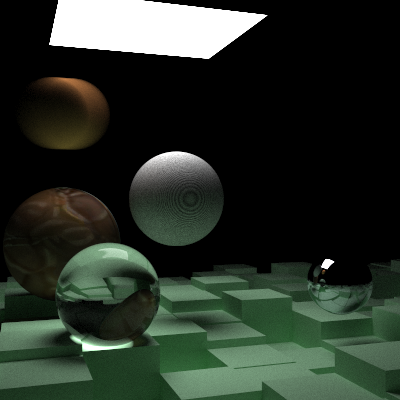
Final Scene Output
A Ray-Tracing algorithm coded exclusively in C for COM S 3360, a course at Iowa State University. This algorithm has the ability to
configure sample size to modify the quality of outputted images and configure the camera to alter the view of the rendered image.
A majority of features I implemented were derived from the Ray Tracing in One Weekend series by Peter Shirley, Trevor David Black, and
Steve Hollasch. Triangle mesh loading and computational concepts were derived from Physically Based Rendering:From Theory To
Implementation, by Matt Pharr, Wenzel Jakob, and Greg Humphreys. I utilized meshes from the "Morrowind Enhanced Texture" mod by Project Enhance
(uploaded by DassiD) from Nexusmods as well as the "Low-Poly Eevee" triangle-mesh by F. Flowalistik from Thingiverse for personal taste.
Pumpkin Tracker | URL
Every year, Reiman Gardens hosts a Spirit of the Gardens event in October, where 1200+ pumpkins are carved and displayed
for each week of the event. Volunteers are requested to help cut out stencils, trace stencils onto pumpkins, and carve them.
All pumpkin statuses are stored in a single excel sheet, where Admins must manually adjust the statuses of each stencil—whether
they've been printed, cut out, traced, or carved. Volunteers will take stencils and pumpkins each week to trace the cut out stencils
and/or carve the traced pumpkins, which that information needs to be sent to the Event Admins so they know what stencils are left that
need to be completed. Additionally, Event Admins for Spirits of the Gardens will select stencils to be used for each week of the event,
which means that week or those weeks will be when the pumpkin with that stencil is displayed. As the stencil database keeps growing,
this process is becoming increasingly time-consuming due to searching through a single excel sheet.
To aid with this issue, my team is currently working with Nathan Brockman—one of the faculty members at Reiman Gardens—to develop an
app called "Pumpkin Tracker" to make tracking event information quick, accurate, and easy. Pumpkin Tracker facilitates the various
interactions with the stencil database by allowing Event Admins to easily add, delete, update, and archive stencils with the simple
click of a few buttons or input from a barcode scanner as opposed to manually editing a row in an excel sheet that contains 1600+ entries.
On the Admin side, there are pages for Login, Event Management, Stencil Selection, and Stencil Management. The Volunteer side was designed
to assist in informing the Event Admins of the tracing and carving statuses of the stencils for each week.
I am primarily working on Frontend for the development of the Mobile and Web Application, which is being set up as a
React app. This involves working extensively with ReactDOM, JavaScript, and HTML/CSS. Our database is being hosted on a DigitalOcean
droplet we deemed appropriate for our applications needs, with the engine running on SQLite. Our team adopted an Agile project development
style since we need to present each design iteration to our client, Nathan Brockman, to receive feedback on user satisfaction and conduct
continuous software testing as we integrate new features.
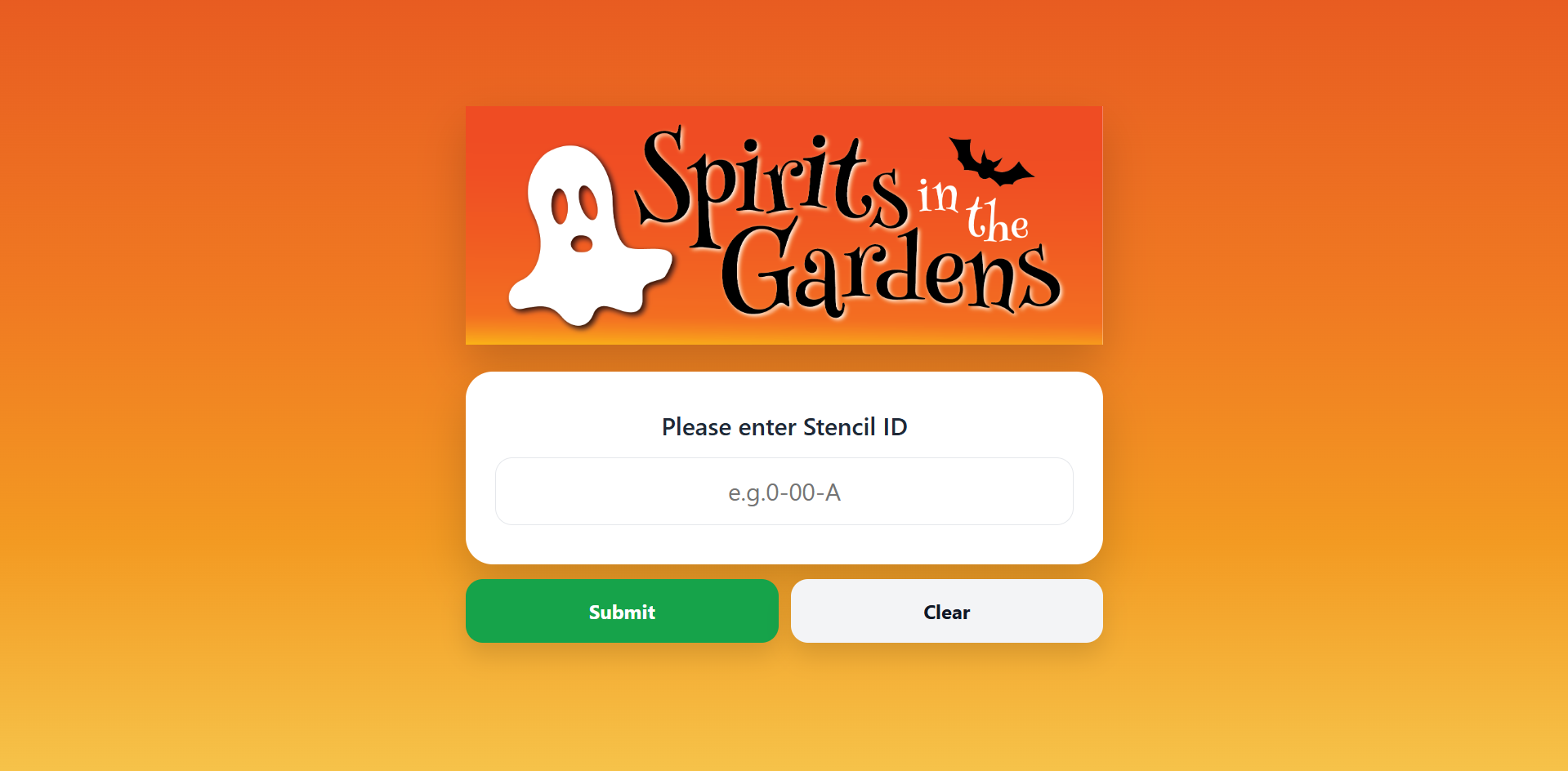
Volunteer Stencil Input page for Pumpkin Tracker
An Admin Login page was implemented to prevent any malicious actors from gaining access to the stencil database and manipulating the data. A password that is only provided to the Event Admins must be inputted to gain any access to the features provided by the Pumpking Tracker's Admin side. Once verified, Admin users will be taken to the Stencil Selection page.
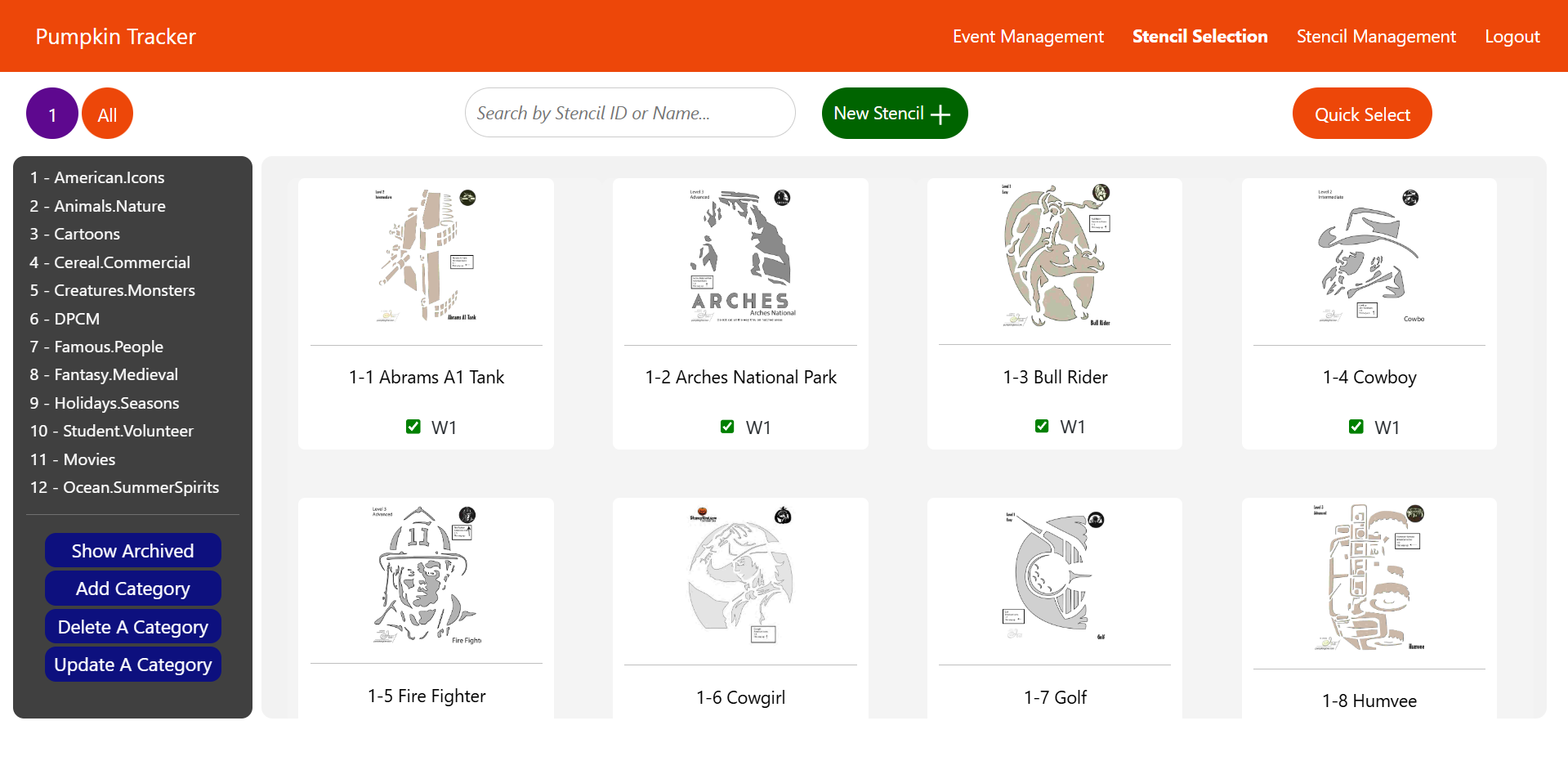
Stencil Selection page for Pumpkin Tracker
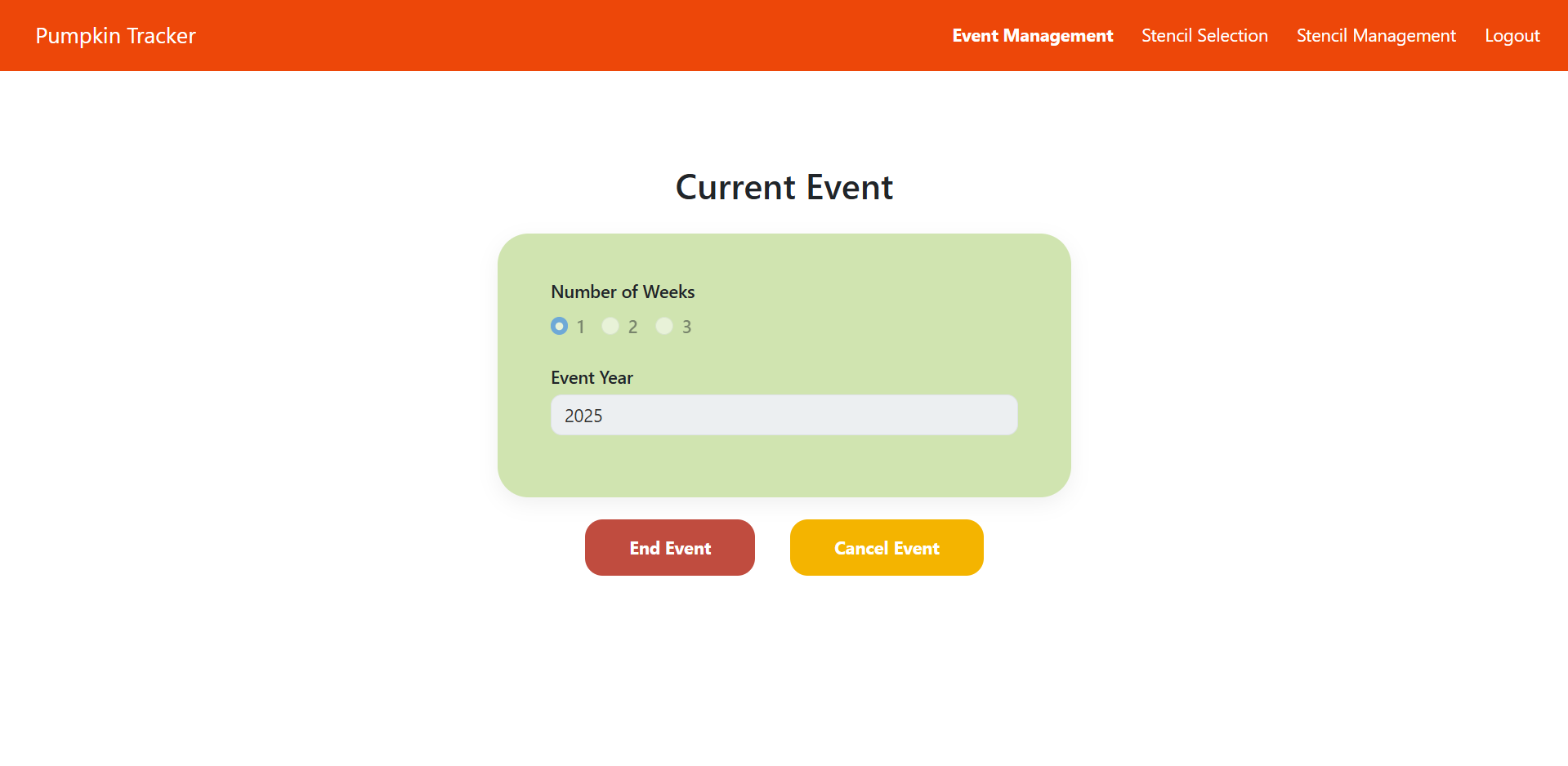
Event Management page for Pumpkin Tracker
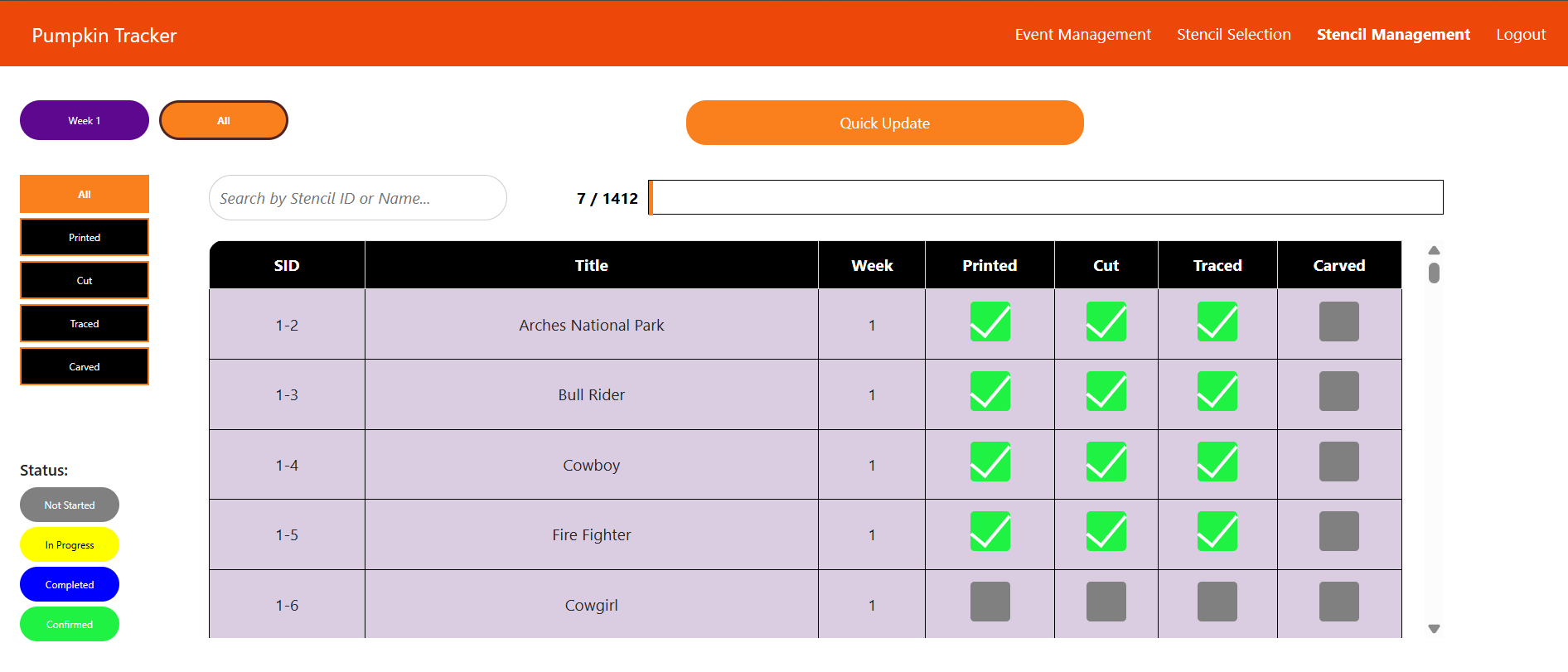
Stencil Management page for Pumpkin Tracker
Pokémon in C/C++ | Source Code
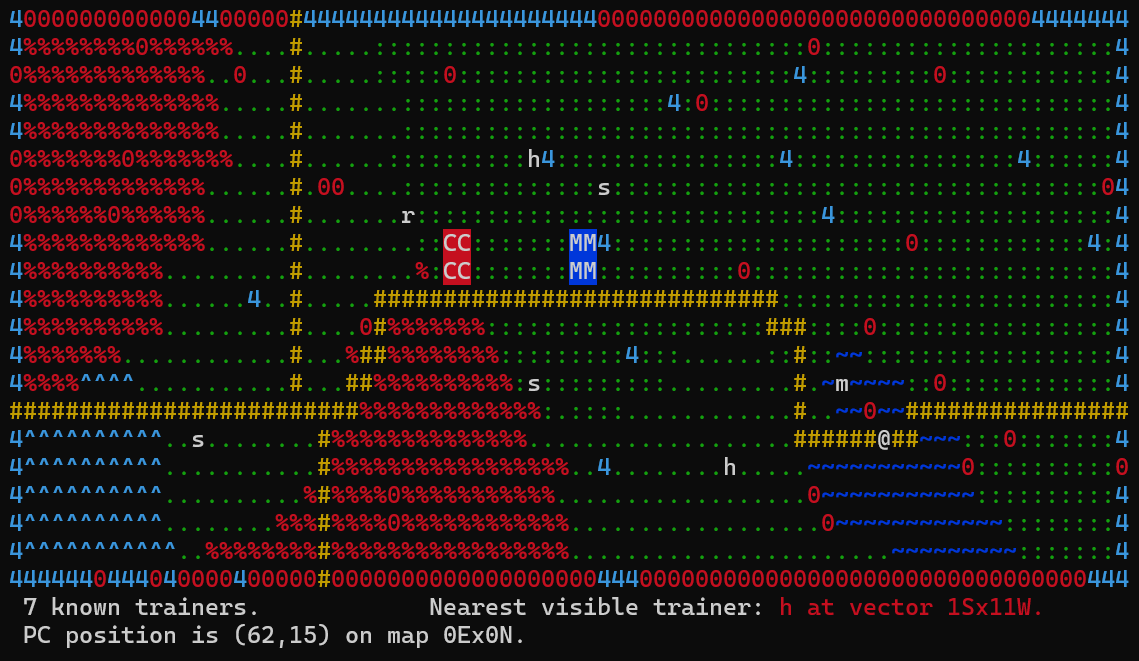
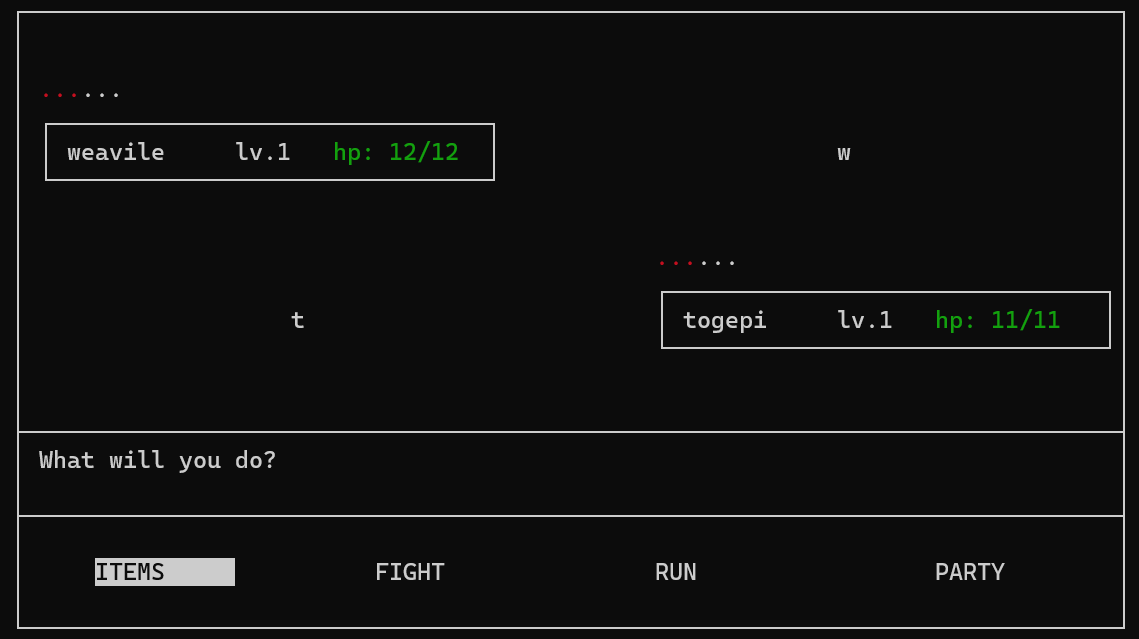
Terminal displays for map and battle sequence
This class project is dedicated to understanding memory management and other advanced coding techniques in C/C++ while
creating a roguelite version of Pokémon. Functionalities like dynamic GUI, NPC AI, map
generation, map traversal, and battle mechanics were required as a baseline for developing a roguelite with the
freedom to add additional features. As an avid Pokémon fan since Gen 4, I programmed this with attempts to
remain faithful to the mechanics of the original Pokémon games.
Dynamic memory management was vital to this project, especially considering the full map grid would be comprised of a total of 400
randomly generated maps and at least 7 randomly generated NPCs per map, each having 3 random pokémon in their party. Maps would
only be generated upon the PC encountering them, which they would be stored in a world data grid for potential use later use or get free'd
once the program is terminated. Instead of printing out each map to the terminal, the ncurses library in C/C++ was included to provide a
dynamically changing GUI for the player.
The game is set on a turn loop, with the PC having the highest priority; all NPCs are waiting
for the PC to complete their turn before taking theirs. NPC's turn decisions are dependent on their behavior (friendly, neutral, or
aggressive) toward the PC and, if aggressive, will determine their next move based on the move costs calculated by an implementation of
dijkstra's algorithm for pathfinding to the PC. If the PC gets ensnared into a wild or trainer battle, the battle UI window will be
displayed, allowing the PC to either use an item, fight with the current pokémon's moves, switch out with one of their
party pokémon, or run (if it's a wild battle). Data for items, pokémon species, movesets, moves, types, statuses, etc. had to be
parsed from CSV files provided in a database accessible in the Pyrite server, which get loaded up at runtime prior to generating the
first map of the game.
By using these techniques and combining these features, I created a functional roguelite version of Pokémon playable in an 80x24 terminal.
Additional functionalities that weren't required but I still implemented include type matchups, solo and party leveling, shiny chances, and
the Pokémon Storage System.
CyHealth
Patient data confidentiality and management has high priority in all healthcare service environments. With the growth of
technology and increasing risks in cyber security, confidentiality has become a large area of concern. Healthcare providers
also desire software solutions for managing and booking appointments, reading and writing to patient data, and providing their
availability to their patients.
I worked with a group of other students to design a Mobile app we named CyHealth to resolve this issue. I was one of 2 members
delegated to the Frontend, where we developed views for Patients, Receptionists, Doctors/Nurses, and Admins. We evaluated user profiles
and the privileges they needed, which boiled down to: Doctors/Nurses having access to all patient data (diagnoses, prescriptions, etc.),
their own availability and scheduled appointments with patients, and any appointment requests; Receptionists having access to Patient
appointment requests and bookings as well as availabilities of all Doctors/Nurses; Patients having access to their personal data, appointment
requests and bookings, and test results; and Admins having access to privileges of workers (Doctors/Nurses and Receptionists).
We developed XML files and Java script files in Android Studio for the Frontend and Maven Projects with IntelliJ for the Backend. To
enable client-server communication, we utilized REST API through HTTP requests and established Websockets throughout the app, which
Websockets were set in places where it was appropriate to receive real-time updates (i.e., Patient appointment request notifications
sent to Receptionist views).
Work Experience
I have been working as a Region 4 Customer Support Representative for John Deere under Kelly Services since June 2025. I assist with product management,
licensing, machine data, and troubleshooting user technical issues. I also document cases for customers and dealers as issues arise and handle cases promptly and
accurately utilizing a variety of resources like Help Documentation, documented solutions for common or similar issues, and personal knowledge.
Frequent collaboration with my colleagues on the Global Support Center team is necessary for notifying the team of system-wide issues and pinpointing solutions
for uncommon and complex cases or questions.
I have worked in the Iowa State Music Department's Recording Studio as an Engineer since January 2024, where I've had the opportunity to gain hands-on experience
with live mixing concerts and recitals in Pro Tools Studio, troubleshooting Audo/Visual technologies, video recording with an ATEM device, webcasting through
Livestream Studio, and editing audio files during post-production. As a Recording Engineer, I also ensure quality control over audio and video
recordings.
I previously worked as a Computer Support Specialist for the Iowa State Music & Theater Department from August 2023 to June 2025. As a Computer Support
Technician, I've handled ticketing queue systems, customer service, software troubleshooting, new machine deployment, MacOS, iOS, Windows 10/11,
system updates, user technology training, network registration, and hardware installation. Working with a team of other technicians, I've ensured
efficient and accurate communication, ticket status updates, and training of newer technicians.