class: center, middle, inverse, title-slide .title[ # ECON 4050: Introduction to Econometrics ] .subtitle[ ## Introduction to R ] .author[ ### Adam Soliman, PhD ] .date[ ### Clemson University ] --- ___ ## What is `R`? `R` is a __programming language__ with powerful statistical and graphic capabilities. ## Why are we using `R`? 1. `R` is __free__ and __open source__—saving both you and the university 💰💵💰. 1. `R` is very __flexible and powerful__—adaptable to nearly any task, (data cleaning, data visualization, econometrics, spatial data analysis, machine learning, web scraping, etc.) 1. `R` has a vibrant, [thriving online community](https://stackoverflow.com/questions/tagged/r) that will (almost) always have a solution to your problem. 1. If you put in the work, you will come away with a __very valuable and useful__ tool. -- ### Moving forward, you will be using R in every class with various tasks, so always bring your laptop (and you should install R and RStudio using instructions from [this link](https://rstudio-education.github.io/hopr/starting.html) before next lecture.) --- # Why can't we just use Excel? Many reasons but here are just a few: - Not ***reproducible***. - Not straightforward to ***merge*** datasets together. - Very fastidious to ***clean*** data. - Limited to ***small datasets***. - Not designed for proper ***econometric analyses***, maps, complex visualisations, etc. --- layout: false class: title-slide-section-red, middle # First Taste of R --- # In Practice: Data Wrangling * You will spend a lot of time preparing data for further analysis. -- * The `gapminder` dataset contains data on life expectancy, GDP per capita and population by country between 1952 and 2007. * Suppose we want to know the average life expectancy and average GDP per capita for each continent in each year. * We need to group the data by continent *and* year, then compute the average life expectancy and average GDP per capita -- .pull-left[ ``` r # load the dataset from dropbox gapminder <- read.csv("https://www.dropbox.com/scl/fi/5j1rqye1tvpmk6eqhnand/gapminder.csv?rlkey=4aar6bmn9f5vvi423uds0rk7e&dl=1") # show first 4 lines of this dataframe head(gapminder,n = 4) # how many rows in the dataset? nrow(gapminder) ``` ] .pull-right[ ``` ## country continent year lifeExp pop gdpPercap ## 1 Afghanistan Asia 1952 28.801 8425333 779.4453 ## 2 Afghanistan Asia 1957 30.332 9240934 820.8530 ## 3 Afghanistan Asia 1962 31.997 10267083 853.1007 ## 4 Afghanistan Asia 1967 34.020 11537966 836.1971 ``` ``` ## [1] 1704 ``` ] --- # In Practice: Data Wrangling * There are always several ways to achieve a goal, as in life 😁, and we only focus on the `dplyr` way: ``` r # compute the required statistics gapminder_dplyr <- gapminder %>% group_by(continent, year) %>% summarise(count = n(), mean_lifeexp = mean(lifeExp), mean_gdppercap = mean(gdpPercap)) ``` ``` r # show first 5 lines of the new data head(gapminder_dplyr, n = 5) ``` ``` ## # A tibble: 5 × 5 ## # Groups: continent [1] ## continent year count mean_lifeexp mean_gdppercap ## <fct> <int> <int> <dbl> <dbl> ## 1 Africa 1952 52 39.1 1253. ## 2 Africa 1957 52 41.3 1385. ## 3 Africa 1962 52 43.3 1598. ## 4 Africa 1967 52 45.3 2050. ## 5 Africa 1972 52 47.5 2340. ``` ``` r # how many rows in the dataset nrow(gapminder_dplyr) ``` ``` ## [1] 60 ``` --- # Visualization .pull-left[ * Now we could *look* at the result in `gapminder_dplyr`, or compute some statistics from it. * Nothing beats a picture, though: ``` r ggplot(data = gapminder_dplyr, mapping = aes(x = mean_lifeexp, y = mean_gdppercap, color = continent, size = count)) + geom_point(alpha = 1/2) + labs(x = "Average life expectancy", y = "Average GDP per capita", color = "Continent", size = "Nb of countries") + theme_bw() ``` ] -- .pull-right[ <img src="chapter_intro_files/figure-html/gampminder_plot-1.svg" style="display: block; margin: auto;" /> ] --- # Animated Plotting 👌 .center[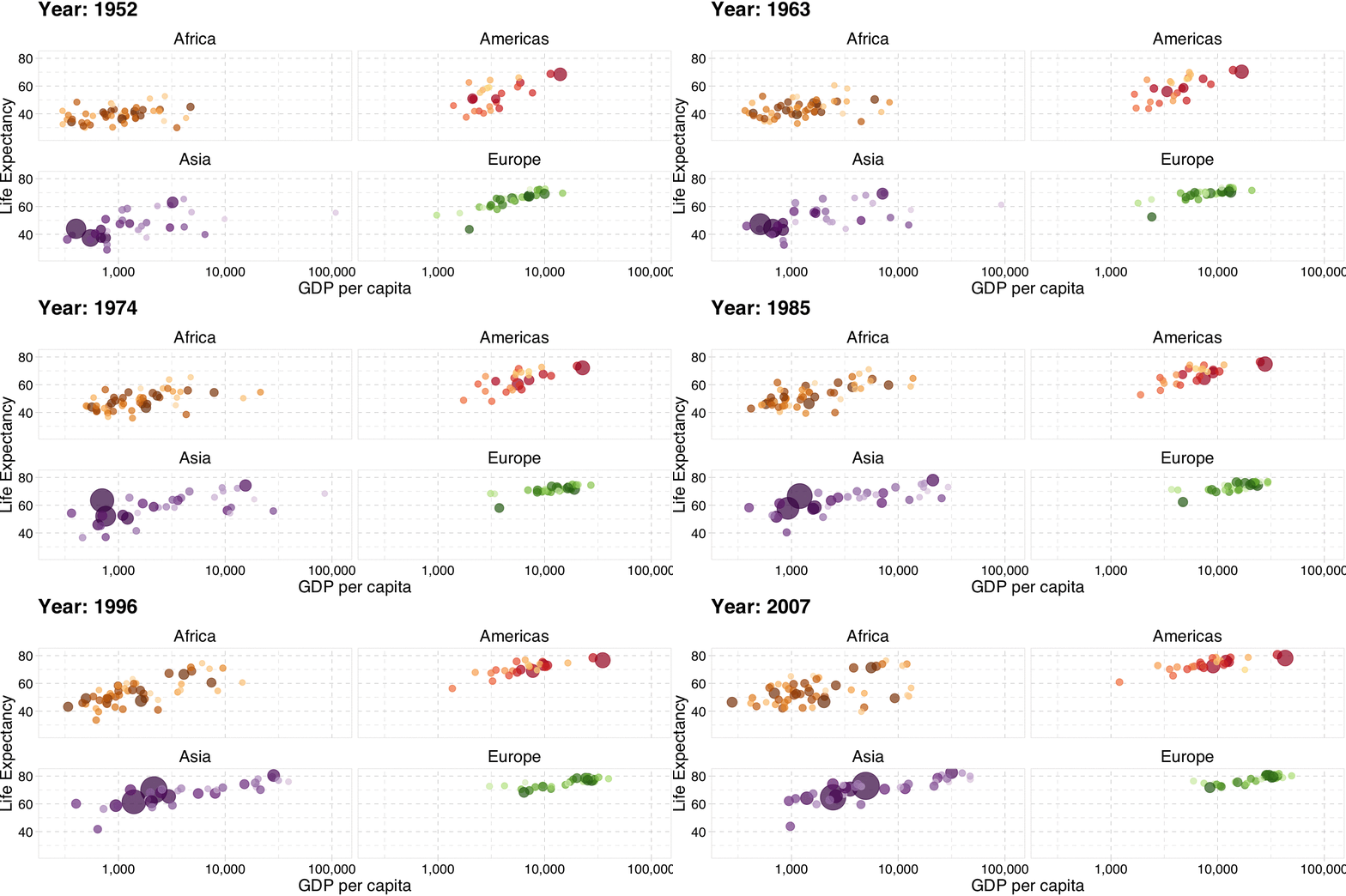] --- # Quick Re-Anchor: Thinking About Selection Bias Recall our earlier examples (e.g., *Clemson vs. USC students* or *Dewey Defeats Truman*): **naive comparisons can conflate causal effects with pre-existing differences between groups.** Before moving back into R and regression analysis, let’s look at two conceptual examples. -- ## Example 1: Job Training **Research question:** What is the impact of a *voluntary* job-training program on earnings? **Setup:** Compare post-training earnings of individuals who enroll in the program to those who do not. **Question:** What would be your main concern with using this comparison to infer the causal effect of training? --- # Quick Re-Anchor: Thinking About Selection Bias ## Example 2: Exercise and Health **Research question:** What is the impact of exercise on health? **Setup:** Compare health outcomes of individuals who go to the gym with those who do not. **Question:** Why might this comparison fail to identify the causal effect of exercise? -- **Key take-away for both examples**: selection into treatment means treated and untreated differ even absent treatment. --- layout: false class: title-slide-section-red, middle # R 101: Here Is Where You Start --- # Start your `RStudio`! ## First Glossary of Terms * `R`: a programming language. * `RStudio`: an integrated development environment (IDE) to work with `R`. * *command*: user input (text or numbers) that `R` *understands*. * *script*: a list of commands collected in a text file, each separated by a new line, to be run one after the other. * To run a script, you need to highlight the relevant code lines and hit `Ctrl`+`Enter` (Windows) or `Cmd`+`Enter` (Mac). --- # `RStudio` Layout <img src="chapter_intro_files/figure-html/rstudio.png" width="600px" style="display: block; margin: auto;" /> --- # R Packages * `R` users contribute add-on data and functions as *packages* * Installing packages is easy! Just use the `install.packages` function: ``` r install.packages("ggplot2") ``` * To *use* the contents of a package, we must load it from our library using `library`: ``` r library(ggplot2) ``` --- # `data.frame` and useful functions to describe one `data.frame`s represent **tabular data**. Like spreadsheets. ``` r murders <- read.csv("https://www.dropbox.com/s/zuk0qcfm3kyzs4e/gun_murders.csv?dl=1") str(murders) # `str` describes structure of any R object ``` ``` ## 'data.frame': 51 obs. of 5 variables: ## $ state : chr "Alabama" "Alaska" "Arizona" "Arkansas" ... ## $ abb : chr "AL" "AK" "AZ" "AR" ... ## $ region : chr "South" "West" "West" "South" ... ## $ population: int 4779736 710231 6392017 2915918 37253956 5029196 3574097 897934 601723 19687653 ... ## $ total : int 135 19 232 93 1257 65 97 38 99 669 ... ``` -- ``` r variable.names(murders) # column names ``` ``` ## [1] "state" "abb" "region" "population" "total" ``` ``` r ncol(murders) # number of columns. what is the function for rows? yup, its nrow() ``` ``` ## [1] 5 ``` --- # We are going to do some organization before diving into R 1\. Create a folder on your computer and call it **ECON 4050** 2\. Create three subfolders: a\. **In-Class** b\. **Lab** c\. **Final Project** --- # Let's try some basic R 1\. Create a new R script (File `\(\rightarrow\)` New File `\(\rightarrow\)` R Script). Save it in the *In-Class* subfolder as `lecture_intro.R`. 2\. Type the following code in your script and run it. You can either highlight the code or just put your cursor at the end of the line and click `Run` in the top right corner. Short cut to run code: press `Ctrl` or `Cmd` + `Enter`. ``` r 4 * 8 ``` ``` ## [1] 32 ``` 3\. Type the following code in your script and run it. What happens if you only run the first line of the code? ``` r x = 5 # equivalently x <- 5 x ``` ``` ## [1] 5 ``` **If I only run the first line of code, the object `x` is created in my environment but no output appears in the console. This is because I am not asking `R` to output anything; the only thing I am asking it is to create an object `x` equal to `\(5\)`.** Congratulations, you have created your first `R` "object"! Everything is an object in R! Objects are assigned using `=` or `<-`. --- # Let's move on to some real data...about Clemson football! 1\. Find out (using `help()` or google) how to import a .csv file. Do NOT use the "Import Dataset" button, nor install a package. -- 2\. First, download [clemsonFBSfinances.csv](https://github.com/adamsoliman/IntroEconometrics/blob/master/data%20for%20tasks/clemsonFBSfinances.csv) from Github (click download raw file in the top right of the webpage). Then, in the same script used in the previous task, import it into R in a new object and call it `clemsonfootballdata`. This file contains data on Clemson football finances. It should look something like: ``` r # this is a comment, which you should always use in your code. Note your path will look slightly different clemsonfootballdata <- read.csv("/Users/adamsoliman/Library/CloudStorage/Dropbox/Clemson/Econometrics Course/data for tasks/clemsonFBSfinances.csv") ``` -- 3\. Type in `class(clemsonfootball)` in your script and run the code. What happened and why? Then try with `class(clemsonfootballdata)`. Did that work? 4\. Find out what variables are contained in the data by running `names(clemsonfootballdata)` in your script. 5\. View the contents of the dataset by clicking on `clemsonfootballdata` in your workspace. What does the `Medical` variable correspond to? 6\. Find out what years are in the dataset by running `table(clemsonfootballdata$Year)`. What is the unit of observation? 7\. How many observations are there in `clemsonfootballdata`? Use `nrow(clemsonfootballdata)`. --- class: title-slide-final, middle This was just a brief introduction, so do not worry if it felt like a lot. Not only are there tons of resources online (such as those referenced on the course website and in lecture notes), but you have a weekly lab that is dedicated to R and Econometrics. Note that [Hands-On Programming with R](https://rstudio-education.github.io/hopr/index.html) more generally is another useful resource.