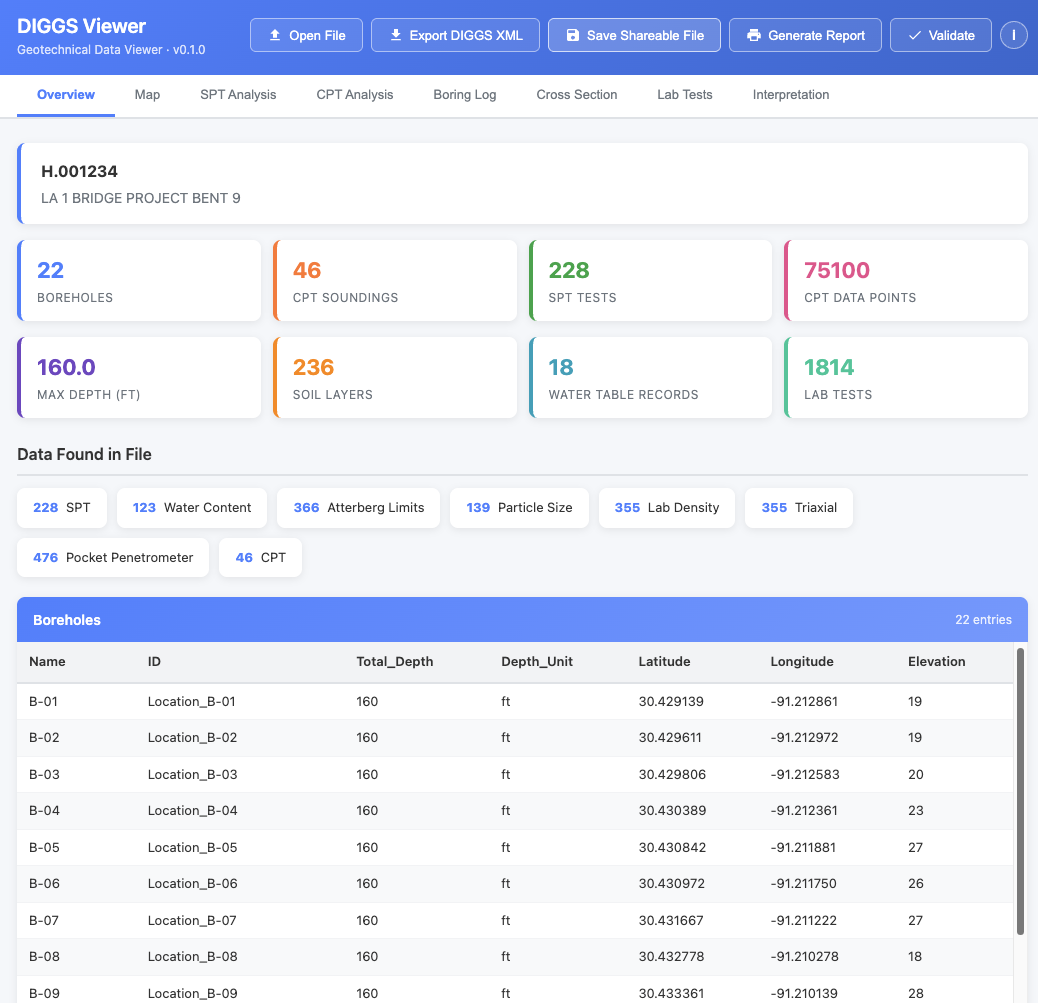
The DIGGS Viewer Overview tab: project metadata, data inventory at a glance, and a full borehole table, all from a single double-click.
Let's be honest. DIGGS files are not exactly beach reading.
Since its inception, DIGGS (Data Interchange for Geotechnical and Geoenvironmental Specialists) has excelled at what it was designed to do: give software a clean, standardized, machine-readable format for exchanging geotechnical data. Boring logs, CPT soundings, lab results, spatial coordinates. It's all in there, rigorously structured and ready for any compliant application to consume.
And that's the thing. Software loves DIGGS. Parsers love DIGGS. Databases love DIGGS. But when you open a DIGGS file and see a wall of angle brackets and namespace declarations? Not exactly the boring log you were hoping to review before your 2 o'clock meeting.
The Core Tension
DIGGS was built to be machine-readable, and it's great at that job. But data doesn't just move between machines. It moves between people. Engineers review it. Clients ask about it. Regulators need to see it. The format that makes DIGGS powerful for interoperability is the same thing that makes it opaque to the human eye.
We've heard this feedback loud and clear. So the DIGGS team asked a simple question: what if we could make DIGGS data just as easy to read for humans as it is for machines, without changing a single byte of the original file?
The answer didn't come from a corporate lab or a consulting firm. It came from a student who saw the problem and built a solution in nine weeks.
In early 2026, the Geo-Institute's DIGGS project launched the 2026 DIGGS Student Hackathon, a nine-week challenge running from January through March that invited students to build innovative tools using the DIGGS standard. Teams could tackle any of five challenge themes, from data conversion and validation to visualization and cross-discipline integration. The hackathon provided sample DIGGS files, weekly office hours, and access to datasets through Geosetta.org to help teams hit the ground running.
The Ground Decoder team from the University of Utah, led by Ripon Chandra Malo, with advisors Dr. Tong Qiu and Dr. Kami Mohammadi, took on the Visualization theme and built DIGGS Analyzer: a tool that could parse a DIGGS XML file and render its contents as interactive boring logs, charts, maps, and tables, all running entirely in a web browser. No server. No installation. Just open a file and see your data.
When the teams presented their work in Salt Lake City in March 2026, Ground Decoder's approach stood out. The judges recognized what every geotechnical engineer in the room was thinking: this is exactly what DIGGS has been missing. DIGGS Analyzer took home the winning prize.
The DIGGS Technical Committee saw the potential immediately. Working with Ripon and the Ground Decoder team, the hackathon prototype has been developed into the full-featured DIGGS Viewer, along with the wrapping concept that packages it all into a single, shareable file. What started as a student project is now a production tool serving the entire geotechnical community.
The DIGGS Wrapper takes your DIGGS XML file and wraps it inside a single, self-contained HTML file that works as an interactive data viewer. No software to install. No accounts to create. No server to connect to. No internet required.
Double-click the file. It opens in your web browser. You're done.
Your boring logs, CPT profiles, SPT charts, maps, lab data, and cross sections are right there in front of you: interactive, zoomable, and ready to review. No Python. No command line. No IT department. If you can double-click a file and you have a web browser, you can view DIGGS data.
As you can see, the viewer opens to an Overview tab with your project metadata, a data inventory showing exactly what's in the file, and a full borehole table. Across the top, tabs give you direct access to your SPT and CPT analysis, boring logs, cross sections, lab tests, and more. The viewer intelligently shows only the tabs relevant to your data, so there's no clutter and no empty screens.
Everything is interactive: hover over a data point to see its value, zoom into a chart, click a borehole on the map to jump to its details. The viewer automatically detects measurement units from your data (feet or meters, tsf or kPa) and displays them correctly throughout.
The viewer also includes a built-in DIGGS validator: open a wrapped file and you can confirm on the spot that the embedded DIGGS XML is standards-compliant. No separate tool, no upload to a third-party service.
If you have a DIGGS XML file and just want to look at it, this is your fastest path:
That's it. The viewer file is reusable. Keep it on your desktop and open it any time you have a new DIGGS file to review.
Sometimes you don't just want to view a DIGGS file, you want to package it so that anyone who receives the file can see the data immediately, without needing to download a separate viewer. You can do this right from the viewer itself: load your DIGGS file into the viewer, then save the HTML page. The saved file now contains your data baked inside. Send it to a colleague and they just double-click to see everything.
For automated workflows, developers can also create wrapped files programmatically using the Geosetta DIGGS Wrapper API. (More details in the For Developers section below.)
Want to see a wrapped DIGGS file before you try it with your own data? We've included an example wrapped file right in the diggs-viewer repository. Download it, double-click it, and explore a real DIGGS dataset in your browser.
For even more data, Geosetta.org is now serving all of its historic geotechnical exploration data as wrapped DIGGS files. Head to the Geosetta web map, browse to a location, and download a wrapped file for any available borehole or exploration point. Double-click the file and you'll see boring logs, test data, and all of it right in your browser.
This is the part worth emphasizing: the wrapper does not modify your DIGGS file. Your original XML data is embedded inside the HTML wrapper completely intact and untouched. The wrapper adds a presentation layer on top of your data. It doesn't replace it, compete with it, or alter it in any way.
Imagine mailing a document. The envelope doesn't change the letter inside; it just makes it deliverable to the right person in a protected package. The DIGGS Wrapper works the same way: it's the envelope that lets your data travel to human audiences while keeping the original content perfectly preserved inside.
Need the original back? The viewer includes a built-in XML Export button that saves the embedded DIGGS data back to a standalone XML file. What you get out is identical to what you put in. For those working with software systems, the original DIGGS XML can also be extracted programmatically. It's embedded in a well-defined location within the HTML file.
The round-trip is lossless. Wrap a file, send it across the country, have someone view it in their browser, extract the XML, and you've got the exact same DIGGS file you started with. The wrapper adds presentation, not transformation.
If you've been on the fence about DIGGS, the wrapper removes one of the most common objections: "I can't see what's in the file." Now you can. And so can everyone you share it with.
Consider these scenarios:
If you build software that produces or processes DIGGS files, the Geosetta DIGGS Viewer API lets you integrate wrapping directly into your workflow. Send your DIGGS XML, get back a single self-contained HTML report with charts, tables, boring logs, and cross-sections all rendered client-side. No server, no proprietary software, just a browser.
Wrap a DIGGS file into a viewer:
POST https://geosetta.org/api/viewer/wrap

Content-Type: multipart/form-data
Body: DIGGS XML file (up to 50 MB, UTF-8)
Optional: logo image (embedded in the report header, re-encoded
          to PNG with metadata stripped)

Response: {filename}_viewer.html (self-contained, works offline)
No authentication required. The returned file includes all JavaScript, CSS, and visualization libraries bundled inside, so your users won't need an internet connection to view it. Pass a logo and the output looks like a first-party deliverable.
Recently added: pre-branded viewer shells
POST https://geosetta.org/api/viewer/template

Returns: the viewer HTML with your branding pre-applied,
         but no DIGGS data inside
Cache the template once, then drop fresh DIGGS XML into it with a single string replace each time you need a new report. This is useful for pipelines that produce many branded reports from a DIGGS source of truth. You skip the per-file round trip and avoid re-uploading the same logo for every render.
Two endpoints, one outcome: any DIGGS file becomes a polished, shareable HTML report ready to hand off to clients. Full request/response details, examples, and error codes live in the API documentation.
For those who want full control, the diggs-viewer repository on GitHub is open source. You can build viewers locally using the included Python build script, customize the viewer for your needs, or integrate the source directly into your own tools.
The current viewer already covers many of the most common geotechnical data types, but we're just getting started. The DIGGS team is actively working to expand the viewer with support for additional data formats and test types within the DIGGS standard. The goal is straightforward: if your data can be encoded in DIGGS, you should be able to see it in the viewer.
Future enhancements will include additional in-situ test visualizations, expanded laboratory test reporting, instrumentation and monitoring data displays, and more geotechnical calculation tools. The viewer is open source, and we welcome contributions. If there's a data type or visualization you need, open an issue or submit a pull request on the GitHub repository.
For years, DIGGS has been the language that machines use to talk about geotechnical data. With the DIGGS Wrapper, we're making sure humans are part of the conversation too.
Your DIGGS file doesn't change. It doesn't get converted, simplified, or dumbed down. It gets wrapped, given a presentation layer that lets anyone with a web browser see what's inside. And when software needs the raw data, it peels off the wrapper and finds the original file waiting, exactly as it was.
Machine-readable and human-readable. That's not a compromise. It's the best of both worlds.
Published by ASCE Geo-Institute | DIGGS Technical Committee