Introduction to Machine Learning in Python

  • Will take about 1 hour
  • Put yourself on mute
  • Ask questions in the chat

What is machine learning

Machine learning algorithms build a mathematical model based on sample data, known as "training data", in order to make predictions or decisions without being explicitly programmed to do so. - Wikipedia 2020

We try to create something that learns by itself, given some data, to do things.

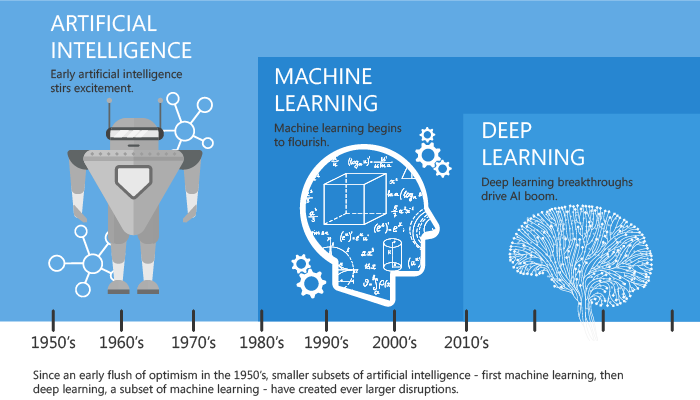
How did it all start

We'll discuss machine learning here. If you are interested in Deep Learning, invite me over another time again :)

How does it compare with programming?

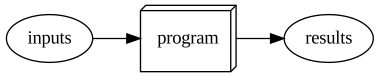
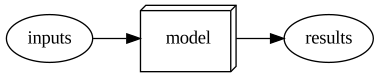
The traditional programming structure

traditional_programming

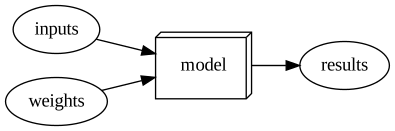
The structure for machine learning

machine-learning

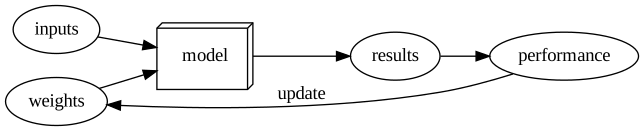
How do we get the right weights (parameters)?

training-loop-ml

When using in a live system

inference

What are we looking at?

These slides are created with a jupyter notebook, which you'll see as well! Jupyter notebooks are a REPL(Read–eval–print loop)-based interface that is the main tool of data scientists. It allows for rapid experimentation and easy plotting! It is build on IPython, which has a lot of cool things as well!

In [30]:
import numpy as np
??np.arange
In [4]:
import matplotlib.pyplot as plt 
x = np.arange(-5, 6)
y = x**2 + np.random.normal(size=(len(x)))
plt.show(plt.scatter(x, y))
In [5]:
import plotly.express as px
px.scatter(y=y, x=x)

Lets start with some data!

We're gonna predict the strain of grape plant that wine was made from!

But first a little bit of software. Python package manager is called pip. It is packaged by default with python. The recommended way of installing python is with Anaconda. Furthermore, we will mainly use these two packages for our work here.

  • Scikit Learn - Library that has almost anything you could need for machine learning in python. Install with: pip install scikit-learn
  • Pandas- Very widely used library for handling data as tables. You'll see. Install with: pip install pandas
In [6]:
# Scikit-learn and pandas, two core ML libraries
from sklearn.datasets import load_wine, load_iris
from sklearn.tree import DecisionTreeClassifier
from sklearn import tree
from sklearn.model_selection import train_test_split
import pandas as pd

# Three visualization libraries
import matplotlib.pyplot as plt
import seaborn as sns
import graphviz  # This is a python wrapper around a cli. It requires graphviz in your path. 

Now really some data

In [7]:
wine_raw = load_wine(as_frame=True)
wine = wine_raw['frame']
print(wine_raw.target_names)
wine.sample(5)
['class_0' 'class_1' 'class_2']
Out[7]:
alcohol malic_acid ash alcalinity_of_ash magnesium total_phenols flavanoids nonflavanoid_phenols proanthocyanins color_intensity hue od280/od315_of_diluted_wines proline target
48 14.10 2.02 2.40 18.8 103.0 2.75 2.92 0.32 2.38 6.20 1.07 2.75 1060.0 0
154 12.58 1.29 2.10 20.0 103.0 1.48 0.58 0.53 1.40 7.60 0.58 1.55 640.0 2
147 12.87 4.61 2.48 21.5 86.0 1.70 0.65 0.47 0.86 7.65 0.54 1.86 625.0 2
113 11.41 0.74 2.50 21.0 88.0 2.48 2.01 0.42 1.44 3.08 1.10 2.31 434.0 1
28 13.87 1.90 2.80 19.4 107.0 2.95 2.97 0.37 1.76 4.50 1.25 3.40 915.0 0

data/independent variables: All columns except the column we want to predict.

target/dependent variable: The thing we want to predict, so the target column. This value "depends" on the rest of the data.

So lets train a machine learning model!

In [9]:
# Accuracy: how many predictions were correct ->  sum(1=1, 2=2, 3=3)/total
dt = DecisionTreeClassifier(max_depth=2)
dt.fit(wine.drop('target', axis=1), wine.target)
print(f'Accuracy: {dt.score(wine.drop("target", axis=1), wine.target):.02f}')
Accuracy: 0.92
In [37]:
sample = wine.sample(1)
print(f'Prediction: {dt.predict(sample.drop("target", axis=1)).item()}\nGround truth: {sample["target"].iloc[0]}')
Prediction: 1
Ground truth: 2

Thanks for coming to my ted talk

What is a Decision Tree?

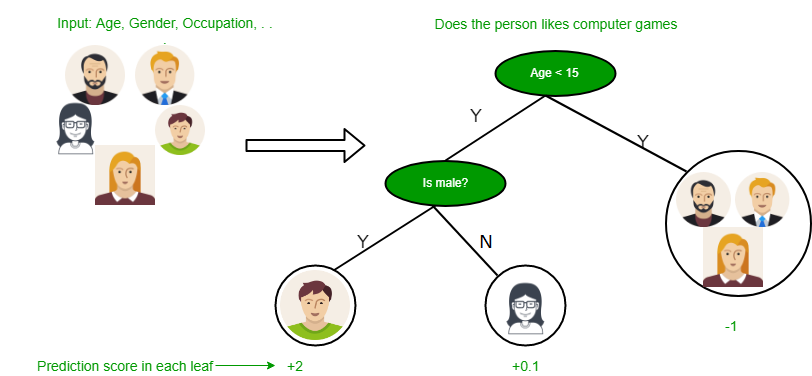
Machine learning algorithm that splits on values of certain columns to predict answers. For example, what kind of contacts is someone wearing? Or, what strain of plant was used for a wine?

Why do we like this?

  • Doesn't require a lot of feature engineering -> can use the data as is.
  • Is very explainable and transparant.

decision_tree_example

In [12]:
tree_viz 
Out[12]:
Tree 0 proline ≤ 755.0 gini = 0.658 samples = 178 value = [59, 71, 48] class = class_1 1 od280/od315_of_diluted_wines ≤ 2.115 gini = 0.492 samples = 111 value = [2, 67, 42] class = class_1 0->1 True 4 flavanoids ≤ 2.165 gini = 0.265 samples = 67 value = [57, 4, 6] class = class_0 0->4 False 2 gini = 0.227 samples = 46 value = [0, 6, 40] class = class_2 1->2 3 gini = 0.117 samples = 65 value = [2, 61, 2] class = class_1 1->3 5 gini = 0.375 samples = 8 value = [0, 2, 6] class = class_2 4->5 6 gini = 0.065 samples = 59 value = [57, 2, 0] class = class_0 4->6

And we can show the importance of each feature

In [13]:
(pd.DataFrame({'importances': dt.feature_importances_}, index=wine.drop('target', axis=1).columns)
     .sort_values('importances', ascending=True)
     .plot(kind='barh')
)
Out[13]:
<matplotlib.axes._subplots.AxesSubplot at 0x2b9d72b5348>

Easy, right?

We might need to do a little due diligence.

How do we know our model is any good?

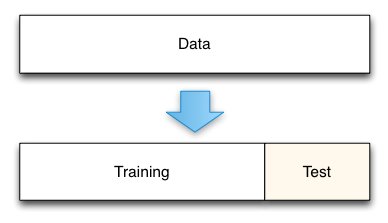
Our model trains on all data and we are also evaluating using that data! That doens't work, the model has already seen that data! So we need a separate data set to evaluate our model.

We split our data into a training set and a test set. The test set is some percentage of the total data set. We will evaluate our model on the test set.
In [14]:
x_train, x_test, y_train, y_test = train_test_split(wine.drop('target', axis=1), wine[['target']], test_size=0.2, shuffle=False)
In [15]:
x_train.shape, y_train.shape, x_test.shape, y_test.shape
Out[15]:
((142, 13), (142, 1), (36, 13), (36, 1))
In [16]:
x_train.head(2)
Out[16]:
alcohol malic_acid ash alcalinity_of_ash magnesium total_phenols flavanoids nonflavanoid_phenols proanthocyanins color_intensity hue od280/od315_of_diluted_wines proline
0 14.23 1.71 2.43 15.6 127.0 2.80 3.06 0.28 2.29 5.64 1.04 3.92 1065.0
1 13.20 1.78 2.14 11.2 100.0 2.65 2.76 0.26 1.28 4.38 1.05 3.40 1050.0
In [17]:
y_train.head(2)
Out[17]:
target
0 0
1 0
In [18]:
dt = DecisionTreeClassifier(max_depth=2, random_state=8)
dt.fit(x_train, y_train)
print(f'Test set accuracy: {dt.score(x_test, y_test):.02f}')
Test set accuracy: 0.72

Oh no! Our accuracy dropped! So it performs a bit worse on data it has never seen.

Well, that ok, since it is still pretty high and we were only allowing the model to use two decisions.

What if we allow it to do more?

In [19]:
dt = DecisionTreeClassifier(max_depth=3, random_state=8)
dt.fit(x_train, y_train)
print(f'Test set accuracy: {dt.score(x_test, y_test):.02f}')
Test set accuracy: 0.92
In [20]:
dt = DecisionTreeClassifier(max_depth=5, random_state=8)
dt.fit(x_train, y_train)
print(f'Test set accuracy: {dt.score(x_test, y_test):.02f}')
Test set accuracy: 0.89

Accuracy goes down!?

In [21]:
dot_data = tree.export_graphviz(dt, out_file=None, 
                     feature_names=wine.drop('target', axis=1).columns,  
                     class_names=wine_raw.target_names,  
                     filled=True, rounded=True,  
                     special_characters=True)  
tree_viz = graphviz.Source(dot_data)  
tree_viz
Out[21]:
Tree 0 proline ≤ 755.0 gini = 0.57 samples = 142 value = [59, 71, 12] class = class_1 1 flavanoids ≤ 1.235 gini = 0.279 samples = 80 value = [2, 67, 11] class = class_1 0->1 True 12 color_intensity ≤ 3.435 gini = 0.15 samples = 62 value = [57, 4, 1] class = class_0 0->12 False 2 hue ≤ 0.92 gini = 0.355 samples = 13 value = [0, 3, 10] class = class_2 1->2 5 od280/od315_of_diluted_wines ≤ 1.44 gini = 0.086 samples = 67 value = [2, 64, 1] class = class_1 1->5 3 gini = 0.0 samples = 10 value = [0, 0, 10] class = class_2 2->3 4 gini = 0.0 samples = 3 value = [0, 3, 0] class = class_1 2->4 6 gini = 0.0 samples = 1 value = [0, 0, 1] class = class_2 5->6 7 alcohol ≤ 13.175 gini = 0.059 samples = 66 value = [2, 64, 0] class = class_1 5->7 8 gini = 0.0 samples = 60 value = [0, 60, 0] class = class_1 7->8 9 malic_acid ≤ 2.125 gini = 0.444 samples = 6 value = [2, 4, 0] class = class_1 7->9 10 gini = 0.0 samples = 4 value = [0, 4, 0] class = class_1 9->10 11 gini = 0.0 samples = 2 value = [2, 0, 0] class = class_0 9->11 13 gini = 0.0 samples = 4 value = [0, 4, 0] class = class_1 12->13 14 total_phenols ≤ 1.8 gini = 0.034 samples = 58 value = [57, 0, 1] class = class_0 12->14 15 gini = 0.0 samples = 1 value = [0, 0, 1] class = class_2 14->15 16 gini = 0.0 samples = 57 value = [57, 0, 0] class = class_0 14->16
In [22]:
accuracies = []
max_depths = [1, 2, 3, 5]
for max_depth in max_depths:
    dt = DecisionTreeClassifier(max_depth=max_depth, random_state=8)
    dt.fit(x_train, y_train)
    accuracy = dt.score(x_test, y_test)
    accuracies.append(accuracy)
    print(f'Test set accuracy with max depth of {max_depth}: {accuracy:.02f}')
plt.plot(max_depths, accuracies, 'bo-')
plt.xlabel('Max tree depth')
plt.ylabel('Test set Accuracy')
plt.show()
Test set accuracy with max depth of 1: 0.00
Test set accuracy with max depth of 2: 0.72
Test set accuracy with max depth of 3: 0.92
Test set accuracy with max depth of 5: 0.89

Overfitting

A model or analysis that corresponds too closely or exactly with a particular set of data, and may therefor fail to generalize to new data points. The model is fitting to noise in the train set (not the thing we want to model).
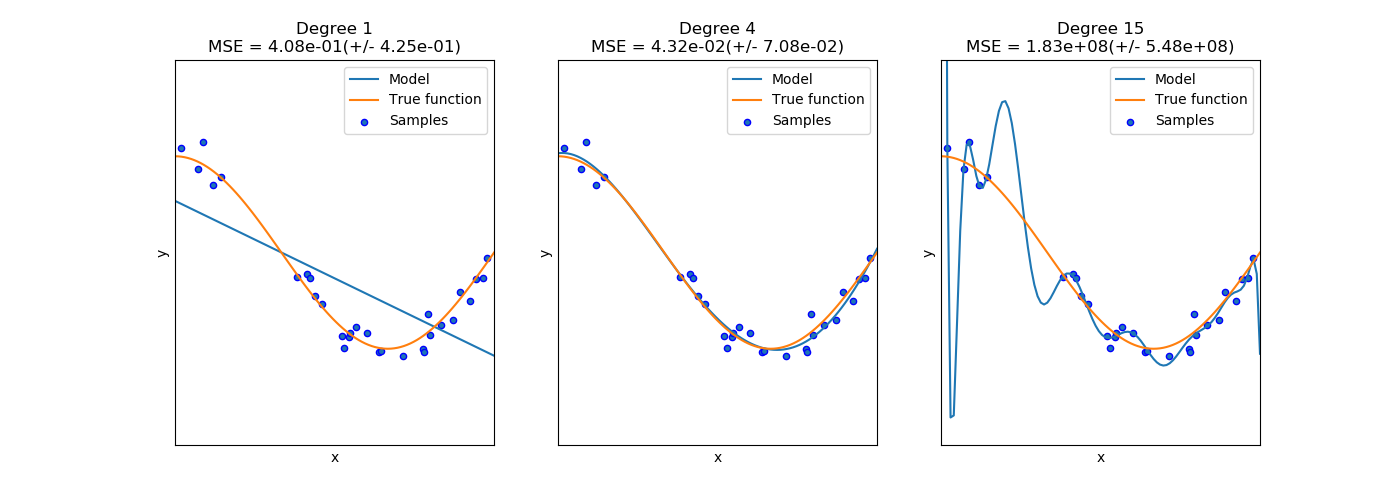
We can try to prevent overfitting by:

  1. Using more data (not always an option)
  2. Reduce parameters in the model (Like reducing max depth)
  3. Regularize the model (Like requiring multiple data points for each leaf-node)

In our case, it means we set the max tree depth to ca. 5, since that seemed to give the best result.

Stepping back a bit

We have seen:

  1. What a decision tree is
  2. What a train and test set are
  3. What overfitting is

To give some extra context:

  • This was a supervised machine learning problem
  • It was a classification task

Types of machine learning

  1. Supervised learning - We have labels (Strain of grape plant)
  2. Unsupervised learning - We don't have labels (We want to find similar data points)
  3. Reinforcement learning - The algorithms learns from its own predictions (We want to play a game)

Types of supervised learning:

  1. Classification - Predict one of several classes. (Strain of grape plant, Animal, gender, etc.)
  2. Regression - Predict a continuous value. (Price, weight, height, etc)

Going a bit deeper: Random Forests

What other machine learning algorithms are there? We have the big brother of decision trees: random forests! They reduce the problem of overfitting of a single decision tree.

  • Consist of a large number of individual decision trees (Ensemble)
  • Are fit to a random subset of the training dataset (Boosted Aggregation, or bagging)
  • Predict with the mode or mean of the predictions from each tree.
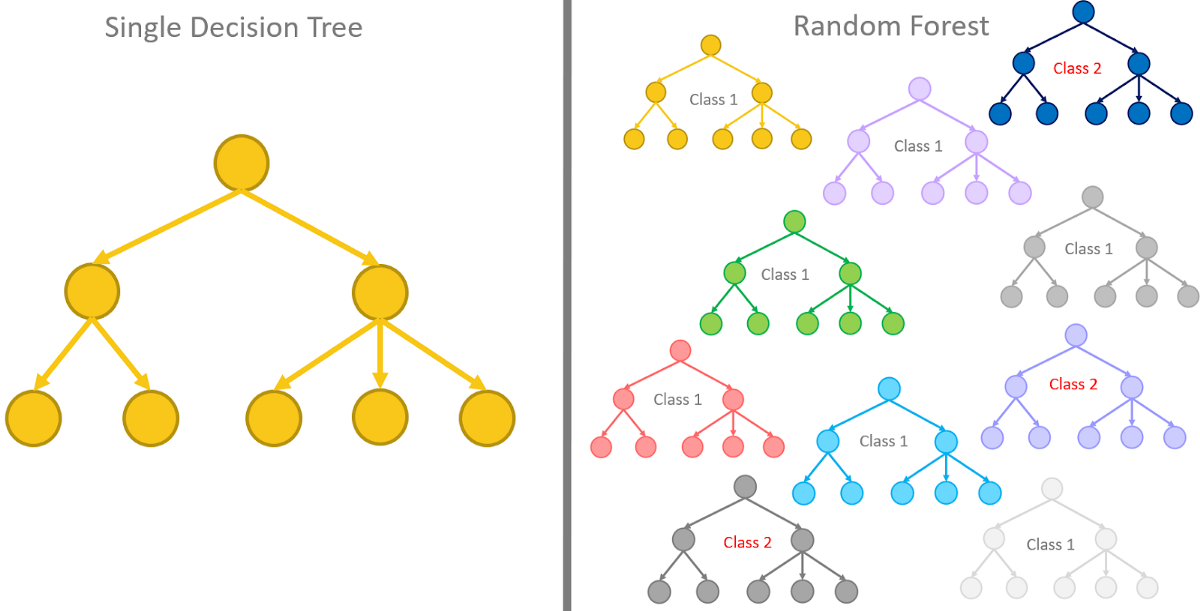
"The low correlation between models is the key. Uncorrelated models can produce ensemble predictions that are more accurate than any of the individual predictions. (...) The reason for this wonderful effect is that the trees protect each other from their individual errors." - Tony Yiu (Understanding Random Forests)

In [24]:
rfs = RandomForestClassifier(n_estimators=5, max_depth=2, random_state=9)
rfs.fit(x_train, y_train)
print('Test set acuraccy of decision tree with max-depth 2: 0.72')
print(f'Test set accuracy: {rfs.score(x_test, y_test):.02f}')
Test set acuraccy of decision tree with max-depth 2: 0.72
Test set accuracy: 0.89
C:\Users\C64062\AppData\Local\Continuum\anaconda3\envs\graphviz\lib\site-packages\ipykernel_launcher.py:2: DataConversionWarning:

A column-vector y was passed when a 1d array was expected. Please change the shape of y to (n_samples,), for example using ravel().

In [29]:
accuracies = []
n_trees = [1, 3, 5, 10]
for n_tree in n_trees:
    rfs = RandomForestClassifier(n_estimators=n_tree, max_depth=3)
    rfs.fit(x_train, y_train.values.reshape(-1))
    accuracy = rfs.score(x_test, y_test)
    accuracies.append(accuracy)
    print(f'Test set accuracy with {n_tree} trees: {accuracy:.04f}')
plt.plot(n_trees, accuracies, 'bo-')
plt.xlabel('Number of Trees')
plt.ylabel('Test set accuracy')
plt.show()
Test set accuracy with 1 trees: 0.2778
Test set accuracy with 3 trees: 0.8889
Test set accuracy with 5 trees: 0.8889
Test set accuracy with 10 trees: 0.8056

Lets make it a bit more interesting

This was only done on a very simple datasetand we have only looking at the modelling, and nothing else around.
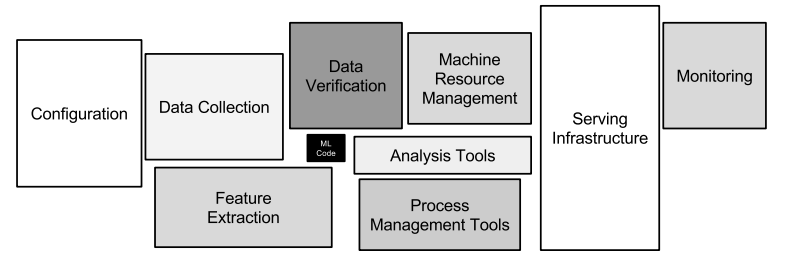
The following example is from a course on ML from the University of San Fransisco. They have a great teacher, Jeremy Howard, who does really well code-first approached to machine learning and deep learning.

In [68]:
bulldozer_raw = pd.read_csv('train_sample.csv', parse_dates=['saledate'], low_memory=False)[:5000]
In [62]:
display_all(bulldozer_raw[:30])
SalesID SalePrice MachineID ModelID datasource auctioneerID YearMade MachineHoursCurrentMeter UsageBand fiModelDesc fiBaseModel fiSecondaryDesc fiModelSeries fiModelDescriptor ProductSize fiProductClassDesc state ProductGroup ProductGroupDesc Drive_System Enclosure Forks Pad_Type Ride_Control Stick Transmission Turbocharged Blade_Extension Blade_Width Enclosure_Type Engine_Horsepower Hydraulics Pushblock Ripper Scarifier Tip_Control Tire_Size Coupler Coupler_System Grouser_Tracks Hydraulics_Flow Track_Type Undercarriage_Pad_Width Stick_Length Thumb Pattern_Changer Grouser_Type Backhoe_Mounting Blade_Type Travel_Controls Differential_Type Steering_Controls saleYear saleMonth saleWeek saleDay saleDayofweek saleDayofyear saleIs_month_end saleIs_month_start saleIs_quarter_end saleIs_quarter_start saleIs_year_end saleIs_year_start saleElapsed
0 1139246 11.097410 999089 3157 121 3.0 2004 68.0 2 316 146 14 -1 -1 -1 52 0 5 5 -1 1 0 -1 1 -1 -1 -1 -1 -1 -1 -1 0 -1 -1 -1 -1 14 2 -1 -1 -1 -1 -1 -1 -1 -1 -1 -1 -1 -1 2 1 2006 11 46 16 3 320 0 0 0 0 0 0 1163635200
1 1139248 10.950807 117657 77 121 3.0 1996 4640.0 2 572 234 19 41 -1 3 55 32 5 5 -1 1 0 -1 1 -1 -1 -1 -1 -1 -1 -1 0 -1 -1 -1 -1 9 2 -1 -1 -1 -1 -1 -1 -1 -1 -1 -1 -1 -1 2 1 2004 3 13 26 4 86 0 0 0 0 0 0 1080259200
2 1139249 9.210340 434808 7009 121 3.0 2001 2838.0 0 92 49 -1 -1 -1 -1 35 31 2 2 -1 2 0 -1 -1 -1 -1 -1 -1 -1 -1 -1 3 -1 -1 -1 -1 -1 2 0 0 1 -1 -1 -1 -1 -1 -1 -1 -1 -1 -1 -1 2004 2 9 26 3 57 0 0 0 0 0 0 1077753600
3 1139251 10.558414 1026470 332 121 3.0 2001 3486.0 0 977 446 -1 23 -1 5 7 42 3 3 -1 1 -1 -1 -1 -1 -1 -1 -1 -1 -1 -1 0 -1 -1 -1 -1 -1 2 -1 -1 -1 -1 -1 -1 -1 -1 -1 -1 -1 -1 -1 -1 2011 5 20 19 3 139 0 0 0 0 0 0 1305763200
4 1139253 9.305651 1057373 17311 121 3.0 2007 722.0 1 1077 486 -1 -1 -1 -1 36 31 2 2 -1 0 0 -1 -1 -1 -1 -1 -1 -1 -1 -1 3 -1 -1 -1 -1 -1 2 0 0 1 -1 -1 -1 -1 -1 -1 -1 -1 -1 -1 -1 2009 7 30 23 3 204 0 0 0 0 0 0 1248307200
5 1139255 10.184900 1001274 4605 121 3.0 2004 508.0 2 161 86 20 -1 -1 -1 1 2 0 0 1 2 0 1 0 0 4 0 -1 -1 -1 -1 -1 -1 -1 -1 -1 -1 -1 -1 -1 -1 -1 -1 -1 -1 -1 -1 -1 -1 -1 -1 -1 2008 12 51 18 3 353 0 0 0 0 0 0 1229558400
6 1139256 9.952278 772701 1937 121 3.0 1993 11540.0 0 493 196 17 -1 20 2 13 8 3 3 -1 0 -1 -1 -1 -1 -1 -1 -1 -1 -1 -1 11 -1 -1 -1 -1 -1 2 -1 -1 -1 1 15 17 2 0 0 -1 -1 -1 -1 -1 2004 8 35 26 3 239 0 0 0 0 0 0 1093478400
7 1139261 10.203592 902002 3539 121 3.0 2001 4883.0 0 254 119 14 -1 -1 -1 1 12 0 0 1 2 0 2 0 1 5 1 -1 -1 -1 -1 -1 -1 -1 -1 -1 -1 -1 -1 -1 -1 -1 -1 -1 -1 -1 -1 -1 -1 -1 -1 -1 2005 11 46 17 3 321 0 0 0 0 0 0 1132185600
8 1139272 9.975808 1036251 36003 121 3.0 2008 302.0 2 265 122 23 -1 -1 4 16 42 3 3 -1 0 -1 -1 -1 -1 -1 -1 -1 -1 -1 -1 3 -1 -1 -1 -1 -1 1 -1 -1 -1 0 15 17 2 0 0 -1 -1 -1 -1 -1 2009 8 35 27 3 239 0 0 0 0 0 0 1251331200
9 1139275 11.082143 1016474 3883 121 3.0 1000 20700.0 1 599 242 7 -1 -1 1 61 8 5 5 -1 1 0 -1 1 -1 -1 -1 -1 -1 -1 -1 0 -1 -1 -1 -1 14 2 -1 -1 -1 -1 -1 -1 -1 -1 -1 -1 -1 -1 2 1 2007 8 32 9 3 221 0 0 0 0 0 0 1186617600
10 1139278 10.085809 1024998 4605 121 3.0 2004 1414.0 1 161 86 20 -1 -1 -1 1 36 0 0 1 2 0 3 0 1 5 0 -1 -1 -1 -1 -1 -1 -1 -1 -1 -1 -1 -1 -1 -1 -1 -1 -1 -1 -1 -1 -1 -1 -1 -1 -1 2008 8 34 21 3 234 0 0 0 0 0 0 1219276800
11 1139282 10.021271 319906 5255 121 3.0 1998 2764.0 2 648 280 17 -1 -1 -1 47 34 4 4 -1 1 -1 -1 -1 -1 5 -1 -1 -1 -1 -1 0 -1 1 -1 -1 -1 -1 -1 -1 -1 -1 -1 -1 -1 -1 -1 0 3 4 -1 -1 2006 8 34 24 3 236 0 0 0 0 0 0 1156377600
12 1139283 10.491274 1052214 2232 121 3.0 1998 0.0 -1 1001 453 -1 44 8 2 11 34 3 3 -1 0 -1 -1 -1 -1 -1 -1 -1 -1 -1 -1 3 -1 -1 -1 -1 -1 2 -1 -1 -1 1 15 3 2 0 0 -1 -1 -1 -1 -1 2005 10 42 20 3 293 0 0 0 0 0 0 1129766400
13 1139284 10.325482 1068082 3542 121 3.0 2001 1921.0 1 257 120 14 -1 -1 -1 1 42 0 0 1 2 0 1 0 1 5 0 -1 -1 -1 -1 -1 -1 -1 -1 -1 -1 -1 -1 -1 -1 -1 -1 -1 -1 -1 -1 -1 -1 -1 -1 -1 2006 1 4 26 3 26 0 0 0 0 0 0 1138233600
14 1139290 10.239960 1058450 5162 121 3.0 2004 320.0 2 75 43 17 -1 -1 -1 1 32 0 0 1 2 0 1 0 1 5 0 -1 -1 -1 -1 -1 -1 -1 -1 -1 -1 -1 -1 -1 -1 -1 -1 -1 -1 -1 -1 -1 -1 -1 -1 -1 2006 1 1 3 1 3 0 0 0 0 0 0 1136246400
15 1139291 9.852194 1004810 4604 121 3.0 1999 2450.0 1 160 86 17 -1 -1 -1 1 3 0 0 3 2 0 1 0 1 5 0 -1 -1 -1 -1 -1 -1 -1 -1 -1 -1 -1 -1 -1 -1 -1 -1 -1 -1 -1 -1 -1 -1 -1 -1 -1 2006 11 46 16 3 320 0 0 0 0 0 0 1163635200
16 1139292 9.510445 1026973 9510 121 3.0 1999 1972.0 2 218 104 -1 -1 -1 4 16 8 3 3 -1 0 -1 -1 -1 -1 -1 -1 -1 -1 -1 -1 3 -1 -1 -1 -1 -1 2 -1 -1 -1 0 15 17 2 0 0 -1 -1 -1 -1 -1 2007 6 24 14 3 165 0 0 0 0 0 0 1181779200
17 1139299 9.159047 1002713 21442 121 3.0 2003 0.0 -1 300 130 40 -1 -1 4 18 48 3 3 -1 0 -1 -1 -1 -1 -1 -1 -1 -1 -1 -1 3 -1 -1 -1 -1 -1 2 -1 -1 -1 1 2 17 2 0 0 -1 -1 -1 -1 -1 2010 1 4 28 3 28 0 0 0 0 0 0 1264636800
18 1139301 9.433484 125790 7040 121 3.0 2001 994.0 2 140 78 -1 -1 -1 4 12 32 3 3 -1 0 -1 -1 -1 -1 -1 -1 -1 -1 -1 -1 3 -1 -1 -1 -1 -1 2 -1 -1 -1 0 15 17 2 1 0 -1 -1 -1 -1 -1 2006 3 10 9 3 68 0 0 0 0 0 0 1141862400
19 1139304 9.350102 1011914 3177 121 3.0 1991 8005.0 1 360 158 53 -1 -1 -1 1 12 0 0 3 0 0 1 0 1 5 0 -1 -1 -1 -1 -1 -1 -1 -1 -1 -1 -1 -1 -1 -1 -1 -1 -1 -1 -1 -1 -1 -1 -1 -1 -1 2005 11 46 17 3 321 0 0 0 0 0 0 1132185600
20 1139311 10.621327 1014135 8867 121 3.0 2000 3259.0 1 882 376 -1 -1 -1 2 14 15 3 3 -1 1 -1 -1 -1 -1 -1 -1 -1 -1 -1 -1 11 -1 -1 -1 -1 -1 2 -1 -1 -1 1 11 17 2 0 0 -1 -1 -1 -1 -1 2006 5 20 18 3 138 0 0 0 0 0 0 1147910400
21 1139333 10.448715 999192 3350 121 3.0 1000 16328.0 1 12 7 20 -1 -1 -1 32 27 1 1 2 0 -1 -1 -1 -1 3 -1 1 5 2 0 4 0 1 1 1 1 -1 -1 -1 -1 -1 -1 -1 -1 -1 -1 -1 -1 -1 -1 -1 2006 10 42 19 3 292 0 0 0 0 0 0 1161216000
22 1139344 10.165852 1044500 7040 121 3.0 2005 109.0 2 140 78 -1 -1 -1 4 12 14 3 3 -1 1 -1 -1 -1 -1 -1 -1 -1 -1 -1 -1 3 -1 -1 -1 -1 -1 2 -1 -1 -1 0 15 17 2 0 0 -1 -1 -1 -1 -1 2007 10 43 25 3 298 0 0 0 0 0 0 1193270400
23 1139346 11.198215 821452 85 121 3.0 1996 17033.0 0 586 238 19 41 -1 3 57 18 5 5 -1 1 0 -1 1 -1 -1 -1 -1 -1 -1 -1 0 -1 -1 -1 -1 11 2 -1 -1 -1 -1 -1 -1 -1 -1 -1 -1 -1 -1 2 1 2006 10 42 19 3 292 0 0 0 0 0 0 1161216000
24 1139348 10.404263 294562 3542 121 3.0 2001 1877.0 1 257 120 14 -1 -1 -1 1 42 0 0 1 2 0 1 0 1 5 0 -1 -1 -1 -1 -1 -1 -1 -1 -1 -1 -1 -1 -1 -1 -1 -1 -1 -1 -1 -1 -1 -1 -1 -1 -1 2004 5 21 20 3 141 0 0 0 0 0 0 1085011200
25 1139351 9.433484 833838 7009 121 3.0 2003 1028.0 1 92 49 -1 -1 -1 -1 35 20 2 2 -1 0 -1 -1 -1 -1 -1 -1 -1 -1 -1 -1 3 -1 -1 -1 -1 -1 1 0 -1 -1 -1 -1 -1 -1 -1 -1 -1 -1 -1 -1 -1 2006 3 10 9 3 68 0 0 0 0 0 0 1141862400
26 1139354 9.648595 565440 7040 121 3.0 2003 356.0 2 140 78 -1 -1 -1 4 12 4 3 3 -1 0 -1 -1 -1 -1 -1 -1 -1 -1 -1 -1 3 -1 -1 -1 -1 -1 1 -1 -1 -1 0 15 17 2 1 0 -1 -1 -1 -1 -1 2006 3 10 9 3 68 0 0 0 0 0 0 1141862400
27 1139356 10.878047 1004127 25458 121 3.0 2000 0.0 -1 833 335 51 -1 -1 2 22 42 3 3 -1 1 -1 -1 -1 -1 -1 -1 -1 -1 -1 -1 11 -1 -1 -1 -1 -1 2 -1 -1 -1 1 15 17 2 0 0 -1 -1 -1 -1 -1 2007 2 8 22 3 53 0 0 0 0 0 0 1172102400
28 1139357 10.736397 44800 19167 121 3.0 2004 904.0 2 426 175 7 -1 -1 -1 32 17 1 1 2 2 -1 -1 -1 -1 2 -1 0 5 2 0 4 0 1 1 0 14 -1 -1 -1 -1 -1 -1 -1 -1 -1 -1 -1 -1 -1 -1 -1 2007 8 32 9 3 221 0 0 0 0 0 0 1186617600
29 1139358 11.396392 1018076 1333 121 3.0 1998 10466.0 1 229 109 9 -1 -1 2 20 22 3 3 -1 1 -1 -1 -1 -1 -1 -1 -1 -1 -1 -1 11 -1 -1 -1 -1 -1 2 -1 -1 -1 1 15 8 2 1 0 -1 -1 -1 -1 -1 2006 6 22 1 3 152 0 1 0 0 0 0 1149120000

Bulldozer data

  • From a kaggle challenge (https://www.kaggle.com/c/bluebook-for-bulldozers)
    • They give you the train data
    • They give you validation data without labels.
    • They give you test data only in the last week of the challenge.
    • They give you the target: predict the sale price of heavy machinery on a certain day
    • They give you the metric: The RMSLE (Root mean squared log error) between predicted price and actual price. $$\sqrt{\frac{1}{n}\sum_{i=1}^{n}(\log(y_i+1) - \log( \hat{y}_i+1))^{2}}$$

Now we have:

  • Several data types (discrete, continuous, dates, NaNs)
  • A continuous target (SalePrice)
  • An interesting target, because the error (how wrong we are) is calculated with the log.

The key fields are in train.csv are:

  • SalesID: the unique identifier of the sale
  • MachineID: the unique identifier of a machine. A machine can be sold multiple times
  • saleprice: what the machine sold for at auction (only provided in train.csv)
  • saledate: the date of the sale

We need to:

  • Preprocess the data
  • Feature engineer the data. This means: how to we get suitable features (input for the model) from our data.

We take the log of the prices so we can just calculate the Root Mean Squared Error, which is a very commonly used metric.

The specific log here is the natural logarithm: $$ y' = \log_{e}(y) $$ where $e$ is the mathematical constant $e$)

In [42]:
bulldozer_raw.SalePrice = np.log(bulldozer_raw.SalePrice)
bulldozer_raw.SalePrice
Out[42]:
0       11.097410
1       10.950807
2        9.210340
3       10.558414
4        9.305651
          ...    
4995    10.257659
4996     8.779557
4997     9.952278
4998    10.518673
4999    10.221941
Name: SalePrice, Length: 5000, dtype: float64
In [43]:
rfs = RandomForestClassifier()
# This will fail due to mixed datatypes
rfs.fit(bulldozer_raw.drop('SalePrice', axis=1), bulldozer_raw.SalePrice)
---------------------------------------------------------------------------
ValueError                                Traceback (most recent call last)
<ipython-input-43-eb1967f3e28e> in <module>
      1 rfs = RandomForestClassifier()
      2 # This will fail due to mixed datatypes
----> 3 rfs.fit(bulldozer_raw.drop('SalePrice', axis=1), bulldozer_raw.SalePrice)

~\AppData\Local\Continuum\anaconda3\envs\graphviz\lib\site-packages\sklearn\ensemble\_forest.py in fit(self, X, y, sample_weight)
    302             )
    303         X, y = self._validate_data(X, y, multi_output=True,
--> 304                                    accept_sparse="csc", dtype=DTYPE)
    305         if sample_weight is not None:
    306             sample_weight = _check_sample_weight(sample_weight, X)

~\AppData\Local\Continuum\anaconda3\envs\graphviz\lib\site-packages\sklearn\base.py in _validate_data(self, X, y, reset, validate_separately, **check_params)
    430                 y = check_array(y, **check_y_params)
    431             else:
--> 432                 X, y = check_X_y(X, y, **check_params)
    433             out = X, y
    434 

~\AppData\Local\Continuum\anaconda3\envs\graphviz\lib\site-packages\sklearn\utils\validation.py in inner_f(*args, **kwargs)
     71                           FutureWarning)
     72         kwargs.update({k: arg for k, arg in zip(sig.parameters, args)})
---> 73         return f(**kwargs)
     74     return inner_f
     75 

~\AppData\Local\Continuum\anaconda3\envs\graphviz\lib\site-packages\sklearn\utils\validation.py in check_X_y(X, y, accept_sparse, accept_large_sparse, dtype, order, copy, force_all_finite, ensure_2d, allow_nd, multi_output, ensure_min_samples, ensure_min_features, y_numeric, estimator)
    801                     ensure_min_samples=ensure_min_samples,
    802                     ensure_min_features=ensure_min_features,
--> 803                     estimator=estimator)
    804     if multi_output:
    805         y = check_array(y, accept_sparse='csr', force_all_finite=True,

~\AppData\Local\Continuum\anaconda3\envs\graphviz\lib\site-packages\sklearn\utils\validation.py in inner_f(*args, **kwargs)
     71                           FutureWarning)
     72         kwargs.update({k: arg for k, arg in zip(sig.parameters, args)})
---> 73         return f(**kwargs)
     74     return inner_f
     75 

~\AppData\Local\Continuum\anaconda3\envs\graphviz\lib\site-packages\sklearn\utils\validation.py in check_array(array, accept_sparse, accept_large_sparse, dtype, order, copy, force_all_finite, ensure_2d, allow_nd, ensure_min_samples, ensure_min_features, estimator)
    597                     array = array.astype(dtype, casting="unsafe", copy=False)
    598                 else:
--> 599                     array = np.asarray(array, order=order, dtype=dtype)
    600             except ComplexWarning:
    601                 raise ValueError("Complex data not supported\n"

~\AppData\Local\Continuum\anaconda3\envs\graphviz\lib\site-packages\numpy\core\_asarray.py in asarray(a, dtype, order)
     81 
     82     """
---> 83     return array(a, dtype, copy=False, order=order)
     84 
     85 

ValueError: could not convert string to float: 'Low'
In [45]:
for col in bulldozer_raw.columns.tolist():
    if bulldozer_raw[col].dtype == 'object':
        bulldozer_raw[col] = bulldozer_raw[col].astype('category')
        
with pd.option_context('display.max_rows', 100, 'display.max_columns', None):
    print(bulldozer_raw.dtypes)
SalesID                              int64
SalePrice                          float64
MachineID                            int64
ModelID                              int64
datasource                           int64
auctioneerID                       float64
YearMade                             int64
MachineHoursCurrentMeter           float64
UsageBand                         category
saledate                    datetime64[ns]
fiModelDesc                       category
fiBaseModel                       category
fiSecondaryDesc                   category
fiModelSeries                     category
fiModelDescriptor                 category
ProductSize                       category
fiProductClassDesc                category
state                             category
ProductGroup                      category
ProductGroupDesc                  category
Drive_System                      category
Enclosure                         category
Forks                             category
Pad_Type                          category
Ride_Control                      category
Stick                             category
Transmission                      category
Turbocharged                      category
Blade_Extension                   category
Blade_Width                       category
Enclosure_Type                    category
Engine_Horsepower                 category
Hydraulics                        category
Pushblock                         category
Ripper                            category
Scarifier                         category
Tip_Control                       category
Tire_Size                         category
Coupler                           category
Coupler_System                    category
Grouser_Tracks                    category
Hydraulics_Flow                   category
Track_Type                        category
Undercarriage_Pad_Width           category
Stick_Length                      category
Thumb                             category
Pattern_Changer                   category
Grouser_Type                      category
Backhoe_Mounting                  category
Blade_Type                        category
Travel_Controls                   category
Differential_Type                 category
Steering_Controls                 category
dtype: object
In [46]:
bulldozer_raw.UsageBand.cat.categories
Out[46]:
Index(['High', 'Low', 'Medium'], dtype='object')
In [49]:
bulldozer_raw.UsageBand.cat.codes
Out[49]:
0       2
1       2
2       0
3       0
4       1
       ..
4995   -1
4996    1
4997    2
4998   -1
4999    1
Length: 5000, dtype: int8
In [48]:
bulldozer_raw.UsageBand.cat.set_categories(['High', 'Medium', 'Low'], ordered=True, inplace=True)
bulldozer_raw.UsageBand
Out[48]:
0          Low
1          Low
2         High
3         High
4       Medium
         ...  
4995       NaN
4996    Medium
4997       Low
4998       NaN
4999    Medium
Name: UsageBand, Length: 5000, dtype: category
Categories (3, object): [High < Medium < Low]

Dates

Dates contain extremely much information. What kind of information could you get from a date?

  • year, month and week

But also

  • month begin/end, quarter begin/end, day of week
In [50]:
??add_datepart
Object `add_datepart` not found.
In [56]:
add_datepart(bulldozer_raw, 'saledate')
Out[56]:
SalesID SalePrice MachineID ModelID datasource auctioneerID YearMade MachineHoursCurrentMeter UsageBand fiModelDesc ... saleDay saleDayofweek saleDayofyear saleIs_month_end saleIs_month_start saleIs_quarter_end saleIs_quarter_start saleIs_year_end saleIs_year_start saleElapsed
0 1139246 11.097410 999089 3157 121 3.0 2004 68.0 2 316 ... 16 3 320 False False False False False False 1163635200
1 1139248 10.950807 117657 77 121 3.0 1996 4640.0 2 572 ... 26 4 86 False False False False False False 1080259200
2 1139249 9.210340 434808 7009 121 3.0 2001 2838.0 0 92 ... 26 3 57 False False False False False False 1077753600
3 1139251 10.558414 1026470 332 121 3.0 2001 3486.0 0 977 ... 19 3 139 False False False False False False 1305763200
4 1139253 9.305651 1057373 17311 121 3.0 2007 722.0 1 1077 ... 23 3 204 False False False False False False 1248307200
... ... ... ... ... ... ... ... ... ... ... ... ... ... ... ... ... ... ... ... ... ...
4995 1156078 10.257659 132613 13792 121 3.0 1997 0.0 -1 682 ... 15 3 106 False False False False False False 1081987200
4996 1156079 8.779557 1039388 17472 121 3.0 1999 1379.0 1 942 ... 25 3 237 False False False False False False 1124928000
4997 1156082 9.952278 1031881 26351 121 3.0 2005 1407.0 2 769 ... 12 3 71 False False False False False False 1236816000
4998 1156083 10.518673 1038005 2232 121 3.0 1997 0.0 -1 1001 ... 20 3 110 False False False False False False 1145491200
4999 1156086 10.221941 1008364 13824 121 3.0 1997 5941.0 1 700 ... 17 3 137 False False False False False False 1179360000

5000 rows × 65 columns

In [57]:
for col in bulldozer_raw.columns:
    if bulldozer_raw[col].dtype.name == 'category':
        bulldozer_raw[col] = bulldozer_raw[col].cat.codes
    if bulldozer_raw[col].dtype ==  'bool':
        bulldozer_raw[col] = bulldozer_raw[col].astype(int)
In [58]:
# This is a regression problem (target is continuous), so we use a regressor instead of a classifier
from sklearn.ensemble import RandomForestRegressor
In [59]:
x_train, x_test, y_train, y_test = train_test_split(bulldozer_raw.drop('SalePrice', axis=1), bulldozer_raw.SalePrice)
In [60]:
rfs = RandomForestRegressor(n_estimators=10)
rfs.fit(x_train.values, y_train.values)
print(f'Test set R2: {rfs.score(x_test, y_test):.04f}')
Test set R2: 0.8193

In statistics, the coefficient of determination, denoted R2 or r2 and pronounced "R squared", is the proportion of the variance in the dependent variable that is predictable from the independent variable(s). https://en.wikipedia.org/wiki/Coefficient_of_determination

In [41]:
preds = np.stack([t.predict(x_test) for t in rfs.estimators_])
preds[:,0], np.mean(preds[:,0]), y_test.iloc[0]
Out[41]:
(array([ 9.472705, 10.275051, 11.302204, 10.778956,  9.798127,  9.581904, 10.23996 ,  9.711116,  9.798127,  9.798127]),
 10.075627695704647,
 9.305650551780507)
In [42]:
from sklearn import metrics
plt.plot([metrics.r2_score(y_test, np.mean(preds[:i+1], axis=0)) for i in range(10)]);

Thanks for attending!

Now, on your way and go use ML!